🦉
Message CenterMicrosoft 365 Updates
HomePermissionsTenant FinderPortfolio
🦉
M365 Message Centerby Cengiz YILMAZ

Track the latest updates, features, and announcements for Microsoft 365 services. Comprehensive archive of service updates and important changes.

Quick Links

HomePermissionsTenant FinderPortfolio

Connect

© 2026 M365 Message Center. Created with ❤️ by Cengiz YILMAZ

Data sourced from Microsoft 365 Message Center • Not affiliated with Microsoft

  1. Home
  2. /
  3. MC689500

OneDrive Open in App availablility

Informational

Message ID

MC689500
View in Admin Center

Roadmap ID

124813
View in Roadmap

Services

OneDrive for Business

Affected Platforms

Web

Details

Updated November 17, 2023: We have updated the content below with additional information.

In the same way that you can open a Word, PowerPoint, or Excel file in their respective desktop apps, you can now open any file in its desktop app, edit it, and the changes will sync to OneDrive. From OneDrive’s My Files or Sharepoint’s Documents, users can now select Open In App to open a file in its native app.
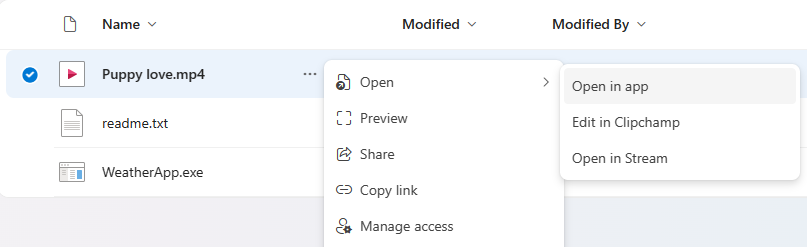
Note: this feature is powered by OneDrive’s Sync Client – it requires having it installed on the user’s machine. In case it’s not running it will start it. 

This message is associated with Microsoft 365 Roadmap ID 124813

When this will happen:

Targeted Release: We will begin rolling out in mid-November 2023.

Standard Release: We will begin rolling out in early December 2023 and expect to complete by late January 2024.

How this will affect your organization:

Users can open any file in its desktop app, edit it, and the changes will sync to OneDrive.

Note: You may encounter unexpected behavior when opening a file that depends on other files. We recommend syncing the containing folder using Add shortcut and trying again.

What you need to do to prepare:

You may consider updating your training and documentation as appropriate.

Timeline

📅
Published
Nov 14, 2023
Message published to Message Center
✏️
Updated
Nov 17, 2023
Message content updated
🏁
End Date
Mar 4, 2024
Message timeline ends

Tags

#Updated message#New feature#User impact

Category

📖Stay Informed

Related Messages

Similar updates

MC686277

Offline mode in OneDrive for Web

Oct 31, 2023
MC683663

Access Microsoft Lists, PowerBI, Loop and Whiteboard Content in OneDrive Web

Oct 23, 2023
MC1024398

Microsoft 365 apps: We will prompt users to back up their files in Microsoft OneDrive

Mar 5, 2025
MC783215

Microsoft OneDrive: Annotate PDFs with text boxes

Apr 22, 2024
MC748381

OneDrive: Media node in OneDrive for web

Mar 20, 2024