MC1523077Teams admin center - Intelligent insights for meeting quality
Summary
AI-powered meeting quality insights in Teams admin center provide proactive detection of issues by analyzing historical data, highlighting hotspots, root causes, and affected users with recommended actions. Rolling out worldwide and GCC from mid-November 2026. No configuration needed; accessible to designated Teams admins.
More information
What and Why:
Gain proactive visibility into meeting quality across your organization with AI-powered insights in Teams admin center that identify emerging patterns, highlight impacted users and locations, and surface likely causes with recommended actions. This helps IT administrators detect and address issues earlier, improve meeting quality, and stay ahead of potential disruptions.
Rollout Schedule:
General Availability (Worldwide): We will begin rolling out in mid-November 2026 and expect to complete by early December 2026.
General Availability (GCC): We will begin rolling out in mid-November 2026 and expect to complete by mid-December 2026.
Impact on Your Organization:
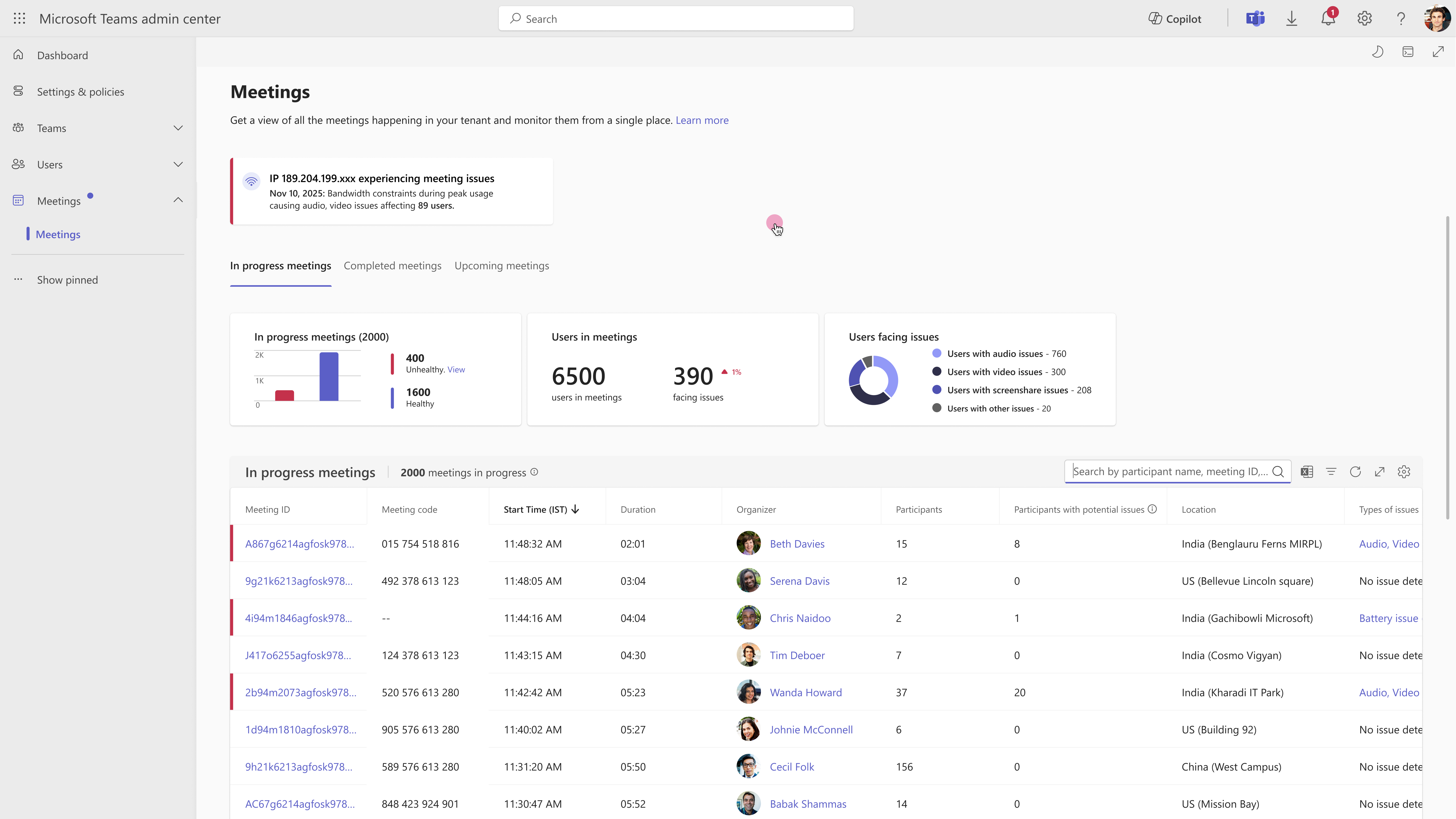
Administrators will find new enhancements to the meeting and call troubleshooting flow in Teams admin center. Administrators can find these insights in Teams admin center > Meetings > Meetings. The experience evaluates historical meeting-quality data across the organization and highlights locations or public IPs where meeting quality is behaving unusually.
When an anomaly is detected, administrators will be able to:
- Identify meeting-quality hotspots across locations and public IPs and see how many users are affected.
- Review quality trends to understand how meeting quality has changed over time.
- Understand likely root causes across network factors such as bandwidth, Wi-Fi, VPN and proxy; compute factors such as CPU, memory and client; and devices such as microphones, cameras and speakers.
- Take recommended actions based on the likely cause and severity of the issue.
- Review affected users and supporting evidence to better understand the scope and impact of the anomaly.
Insights are refreshed daily and use machine learning to dynamically evaluate what constitutes anomalous behavior, so administrators don’t need to configure thresholds.
The insights use meeting data across the tenant and supported clients and platforms. They do not include meeting telemetry from SIP phones or telemetry from PSTN and peer-to-peer calls.
Action Required/Recommendations:
No configuration is required. Once available in your tenant, navigate to Teams admin center > Meetings > Meetings to start reviewing insights. The experience is available to Global Administrators, Teams Administrators, Teams Communications Administrators, Teams Communications Support Engineers, and Teams Communications Support Specialists.
Compliance considerations:
This feature uses AI/machine learning to analyze historical meeting-quality data and surface insights to admins; it does not alter how customer data is stored or processed. Review your organization’s data and AI governance policies as appropriate.