🦉
Message CenterMicrosoft 365 Updates
HomePermissionsTenant FinderPortfolio
🦉
M365 Message Centerby Cengiz YILMAZ

Track the latest updates, features, and announcements for Microsoft 365 services. Comprehensive archive of service updates and important changes.

Quick Links

HomePermissionsTenant FinderPortfolio

Connect

© 2026 M365 Message Center. Created with ❤️ by Cengiz YILMAZ

Data sourced from Microsoft 365 Message Center • Not affiliated with Microsoft

  1. Home
  2. /
  3. MC999442

Microsoft Purview | Data Lifecycle Management: Retention based on “last accessed” for OneDrive and SharePoint files

Plan for Change

Message ID

MC999442
View in Admin Center

Roadmap ID

472030
View in Roadmap

Services

Microsoft Purview

Affected Platforms

Web

Summary

Microsoft Purview will soon enable retention policies based on "last accessed" for OneDrive and SharePoint files, starting preview in late May 2026 and general availability by late June 2026. This feature helps delete obsolete data and improves Microsoft 365 Copilot responses, requiring no admin action before rollout.

Details

Updated December 17, 2025: We have updated the timeline. Thank you for your patience.

Coming soon for Microsoft Purview | Data Lifecycle Management: Admins will be able to apply a retention policy or retention label in Microsoft OneDrive and Microsoft SharePoint for files that have not been accessed by anyone in your organization for a specified period of time. This message applies to retention for Microsoft 365 file types. We will support other file types (non-Microsoft 365) in a future rollout.

This message is associated with Microsoft 365 Roadmap ID 472030.

When this will happen:

Preview: We will begin rolling out late May 2026 (previously late January) and expect to complete by late June 2026 (previously late February)

General Availability (Worldwide): We will begin rolling out late June 2026 (previously mid-January 2026) and expect to complete by late July 2026 (previously mid-July)

How this will affect your organization:

This feature will help delete obsolete data, which will improve the quality and relevance of Microsoft 365 Copilot responses.

This feature will be available by default.

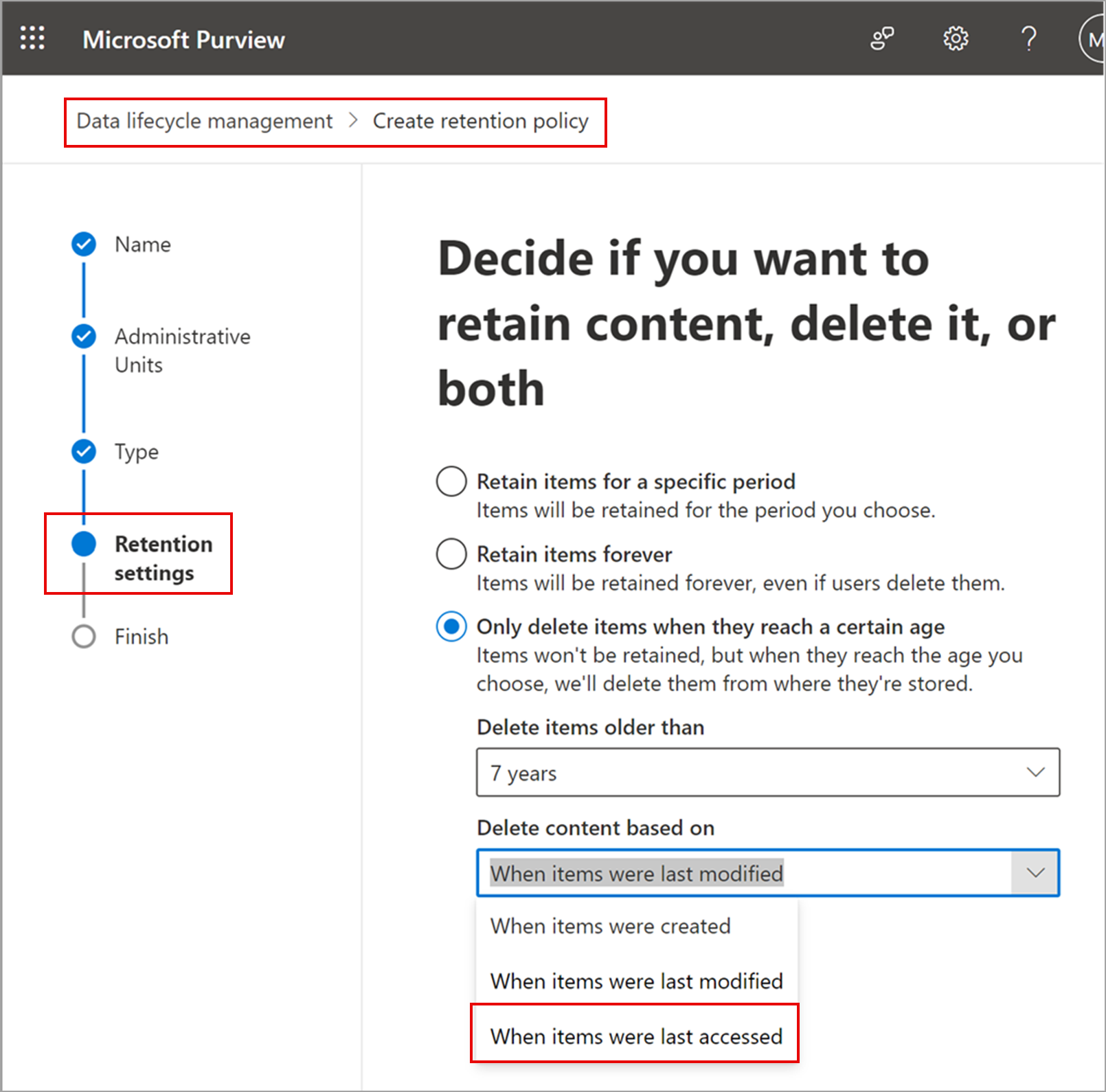
After the rollout, admins can use the retention control When items were last accessed when configuring labels and policies.

Retention settings page in Purview with the new “last accessed” option for retention policies:

admin controls

What you need to do to prepare:

This rollout will happen automatically by the specified date with no admin action required before the rollout. Review your current configuration to determine the impact for your organization. You may want to notify your users about this change and update any relevant documentation.

Before rollout, we will update this post with new documentation.

Timeline

📅
Published
Feb 7, 2025
Message published to Message Center
✏️
Updated
Dec 17, 2025
Message content updated
🏁
End Date
Aug 28, 2026
Message timeline ends

Tags

#Updated message#New feature#Admin impact

Category

📋Plan for Change

Related Messages

Similar updates

MC990961

Microsoft Purview | Insider Risk Management: DLP alerts as indicators

Jan 29, 2025
MC989969

Microsoft Purview | Data Loss Prevention: Trigger Power Automate workflows after DLP rule match (GCC, GCC High, DoD)

Jan 28, 2025
MC1024388

Microsoft Purview compliance portal: Modern eDiscovery enhancements

Mar 5, 2025
MC971035

Updated: Microsoft Purview | Data Lifecycle Management: New secure workflow to bypass legal holds and retention policies

Jan 3, 2025
MC1045212

Microsoft Purview compliance portal: Insider Risk Management user analytics

Mar 31, 2025