What and Why:
We are introducing the Call Flow Visualizer in Teams Admin Center, a new interactive experience that provides a visual representation of Auto Attendant and Teams Phone agent call routing. This enhancement simplifies management of complex call flows, reduces configuration errors, and accelerates troubleshooting while improving admin productivity.
Rollout Schedule:
- General Availability (Worldwide, GCC): Began early June 2026; completed by late June 2026
- General Availability (GCC High, DoD): Will begin mid-August 2026; expected to complete by mid-September 2026
Impact on Your Organization:
Who is affected: Admins managing Auto Attendants and Teams Phone agents
Platforms/Services:
What will happen:
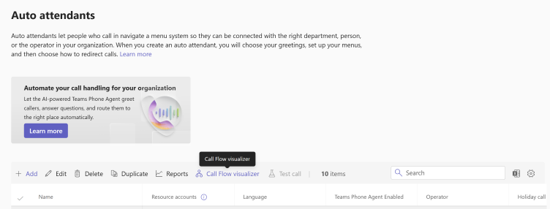
- A new “Call flow visualizer” option will be available on the Auto Attendants page.
- Admins can select an Auto Attendant or Teams Phone agent and select “Call flow visualizer” to view.
Screenshot: The Call flow visualizer option is available from the Auto attendants page in Teams admin center:
- Admins can view call routing in a tree-like, interactive diagram.
- The visualizer will display:
- Resource account assignments
- Greetings
- Business hours routing
- After-hours routing
- Holiday call flow branches
- Interactive controls such as zoom and pan will be supported.
- Upstream and downstream call routing relationships will be visible in a single view.
- Admins can select hierarchical call flows to dig deeper.
- The feature will be enabled by default; no configuration is required.
Action Required/Recommendations:
No action is required.
Recommended next steps:
- Review the new Call flow visualizer in Auto attendants page in Teams Admin Center.
- Update internal documentation or training materials for administrators.
- Inform helpdesk teams about the new troubleshooting capability.
Compliance considerations:
No compliance considerations identified, review as appropriate for your organization.