🦉
Message CenterMicrosoft 365 Updates
HomePermissionsTenant FinderM365 ReportPortfolio
🦉
M365 Message Centerby Cengiz YILMAZ

Track the latest updates, features, and announcements for Microsoft 365 services. Comprehensive archive of service updates and important changes.

Quick Links

HomePermissionsTenant FinderM365 ReportPortfolio

Connect

© 2026 M365 Message Center. Created with ❤ by Cengiz YILMAZ

Data sourced from Microsoft 365 Message Center • Not affiliated with Microsoft

  1. Home
  2. /
  3. MC1269211

Clearer RSVP selection in Outlook Mobile

Informational

Message ID

MC1269211
View in Admin Center

Services

Exchange Online

Summary

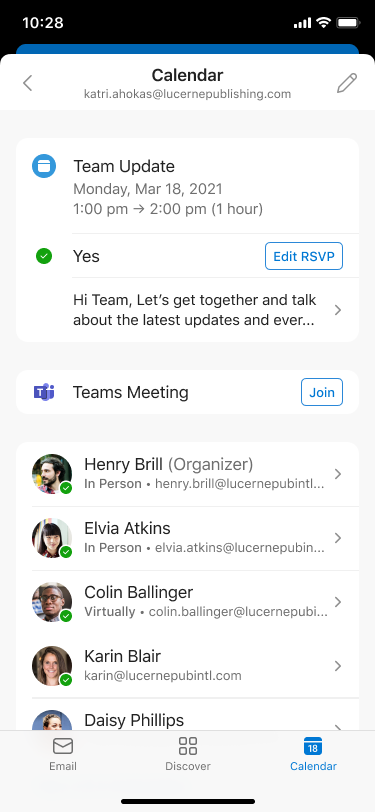
Outlook Mobile will visually highlight users' RSVP responses (Yes, Maybe, No) to meeting invitations starting late April 2026, completing by early June 2026. This applies to all iOS and Android users worldwide, GCC, and GCC High tenants. The feature is enabled by default with no admin action needed.

Details

Introduction

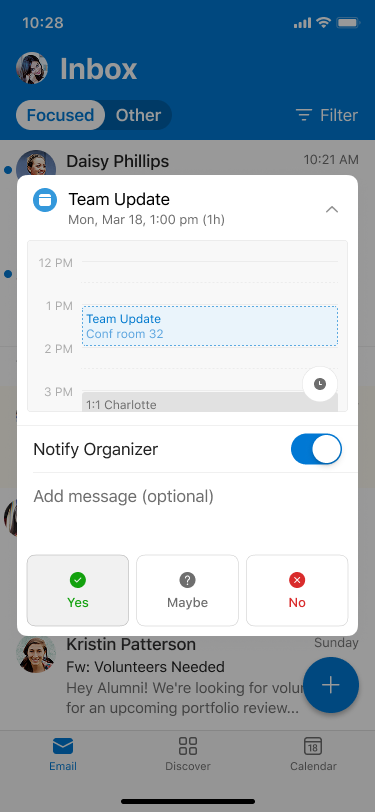
We’re improving the RSVP experience in Outlook Mobile by visually highlighting the response a user has selected (Yes, Maybe, or No). This makes it easier for users to quickly see how they’ve responded to a meeting invitation.

When this will happen:

General Availability (Worldwide, GCC, GCC High): Rollout begins in late April 2026 and is expected to complete by early June 2026.

How this affects your organization:

Who is affected:

  • All users who access Outlook Mobile on iOS or Android
  • Applies to Worldwide, GCC, and GCC High tenants

What will happen:

  • The selected RSVP option (Yes, Maybe, or No) will be visually highlighted
  • user settings

  • Users can quickly confirm how they responded to a meeting invitation and edit as needed
  • user settings

  • The feature is enabled by default
  • No changes to existing meeting workflows or policies
  • No impact to Outlook on the web or Outlook desktop clients

What you can do to prepare:

  • No admin action is required; the update will roll out automatically
  • Consider notifying helpdesk staff of the visual change
  • Update internal documentation if needed

Compliance considerations:

No compliance considerations identified, review as appropriate for your organization.

Timeline

Published
Apr 3, 2026
Message published to Message Center
Updated
Apr 3, 2026
Message content updated
End Date
Jul 2, 2026
Message timeline ends

Tags

#Feature update#User impact

Category

Stay Informed

Related Messages

Similar updates

MC1269212

New option to keep or delete meeting invitations after responding

Apr 3, 2026
MC1267871

Outlook for Android: Unified user interface in text and image previewers

Apr 1, 2026
MC1267870

Outlook for iOS: New attachment actions and updates to previewer experience

Apr 1, 2026
MC1261593

Outlook: Improved handling of disallowed and failed email reactions

Mar 25, 2026
MC1260700

Outlook Mobile: New external image handling option for safe senders

Mar 24, 2026