Updated June 6, 2024: We have updated the content below to clarify the steps to enable the feature. Thank you for your patience.
In Microsoft Teams, you will be able to take or upload a photo and let our AI-enabled technology generate your digital avatar.
When this will happen:
Public Preview: We will begin rolling out early June 2024 (previously mid-May) and expect to complete by late June 2024 (previously mid-June).
How this will affect your organization:
This feature is available in Microsoft Teams on Windows PC and Mac. To activate this option and enter immersive spaces on a PC, the system must meet the following minimum requirements:
- A quad-core processor.
- At least 4 GB of RAM.
The availability of this feature extends to a range of licenses, ensuring a broad spectrum of users can benefit from its capabilities. Eligible licenses include:
- Microsoft Teams Enterprise
- Microsoft Teams Essentials
Additionally, this feature is accessible to subscribers of the following Microsoft 365, Office 365, and Business product suites that incorporate Teams:
- Microsoft 365 Business Basic
- Microsoft 365 Business Standard.
- Microsoft 365 Business Premium
- Microsoft 365 E3/E5
- Office 365 E1/E3/E5
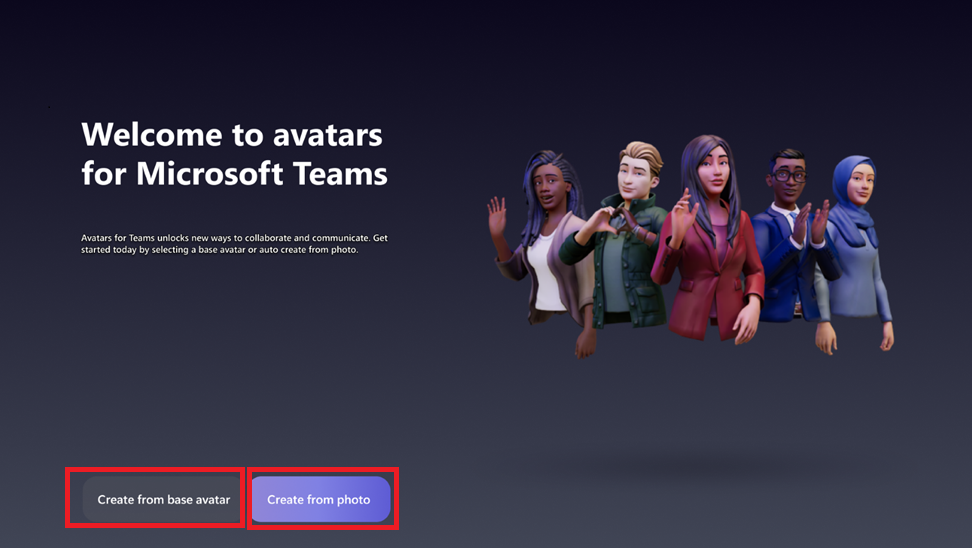
Set up: In the Avatars for Teams app, users can easily create an avatar from a photo by clicking the ‘+’ sign, then choosing ‘Create from photo’. Each user can have up to three avatars. To make a new one when you have three, simply delete an existing avatar first.
The Start page showcases two options to create your avatar. The first option is to create it from base avatar (the original manual process), and the second option is to create it from photo:
Current limitations: The Create avatar from photo feature requires Teams 2.1 or newer and is available exclusively on Teams for Windows PC and Mac. It is not supported in Immersive Spaces or the Mesh Standalone app.
What you need to do to prepare:
To enable the Create avatar from photo feature in Microsoft Teams, turn on Avatars for Microsoft Teams via the Teams Admin Center.
Additional Resources:
Learn more about how to manage apps in the Microsoft Teams admin center:
This feature will also be available in Microsoft Teams 2.1 (i.e., new Teams) for Public Preview.
Mesh, in alignment with the broader M365 policies & operational practices, ensures the safety of your data as you traverse through the platform. Some of our commitments are listed below:
- Mesh secures data at rest and in transit.
- Microsoft does not control your data.
- Mesh data is stored in accordance with M365 data commitments and honors the EU Data Boundary (EUDB).
Microsoft Mesh adopts the privacy features from Microsoft 365, Teams and SharePoint where applicable. For more information, see Microsoft Privacy Statement, General Data Protection Regulation and the Microsoft EU Data Boundary.
- How are users photos being stored?
Users photos are not retained or used for any other purpose. Learn more about Biometric Use in the Create Avatars from Photo feature here.
- Where are they stored?
Users photos are not retained or used for any other purpose. Learn more about Biometric Use in the Create Avatars from Photo feature here.