Services
Affected Platforms
Summary
Microsoft SharePoint is updating version history controls, adding new automatic and manual version limits to help admins manage version storage efficiently. Public Preview starts in May 2024, with General Availability in September 2024. Admins should prepare by reviewing updated documentation and can opt-in for the preview using SharePoint Online Management PowerShell cmdlet. The message includes links for further guidance and feedback.
Details
Updated August 9, 2024, 2024: We have updated the rollout timeline below. Thank you for your patience.
Note: If you receive an error "The requested operation is part of an experimental feature that is not supported in the current environment", this indicates that the feature has not reached your tenant yet.
Version history, a critical part of Microsoft SharePoint’s built-in data protection, tells users how a file has evolved over time. Users can easily revert to an older version if business needs change or if files are damaged by user error or malware. Version storage controls allow you as admins to set an appropriate level of recoverability and auditability for your organization. Based on strong customer feedback, we will release enhanced version storage controls so you can meet your needs efficiently and at scale.
This message is associated with Microsoft 365 Roadmap ID 145802.
When this will happen:
Public Preview: We will begin rolling out early May 2024 and expect to complete by late June 2024. Admins can opt into the Public Preview by running the SharePoint Online Management PowerShell cmdlet Set-SPOTenant -EnableVersionExpirationSetting $true. Please make sure that your SharePoint Online Management Shell is updated to version 16.0.24810.12000 or higher so you can run the specified cmdlets. For guidance, refer to Get started with the SharePoint Online Management Shell.
General Availability (Worldwide): We will begin rolling out mid-September 2024 (previously late August) and expect to complete by mid-October 2024.
How this will affect your organization:
What’s New?
We are introducing new version controls that help admins and content owners reduce storage footprint driven by low value file versions. Previously, document library owners could set count-based version limits at the library level. With this rollout, we are introducing new automatic version limits that consider important factors such as age and restore probability to offer more intelligent version deleting options. We’re also adding manual settings for version expiration and count limits.
Here is a summary of the new capabilities introduced with this rollout:
- New Version history limit options to meet your organization’s recovery objectives and version storage targets. Set version limits to:
- Automatically optimize version recovery and storage without estimating limits; or
- Manually limit versions by count or version age.
- Set default organization Version history limits on new document libraries and Microsoft OneDrive accounts for consistent version storage setting on all new libraries and OneDrive accounts created through the organization.
- Set Site or Library level Version history limits to meet specific content needs by breaking inheritance from organization defaults.
- Report on version storage use of a site or library by generating a CSV report to analyze current usage trends or impact analysis.
- Delete versions from a site or library to reduce existing version storage footprint or align with new limits.
After this rollout completes, you can expect these changes:
1. New Version history limits settings in SharePoint admin center: Admins can set global defaults for all new libraries created in the organization. By default, the organization-level Version history limit will be set to Manually delete versions. Within the Manual limits, the default Number of major versions is set to 500 and the Time period is set to Never expire.
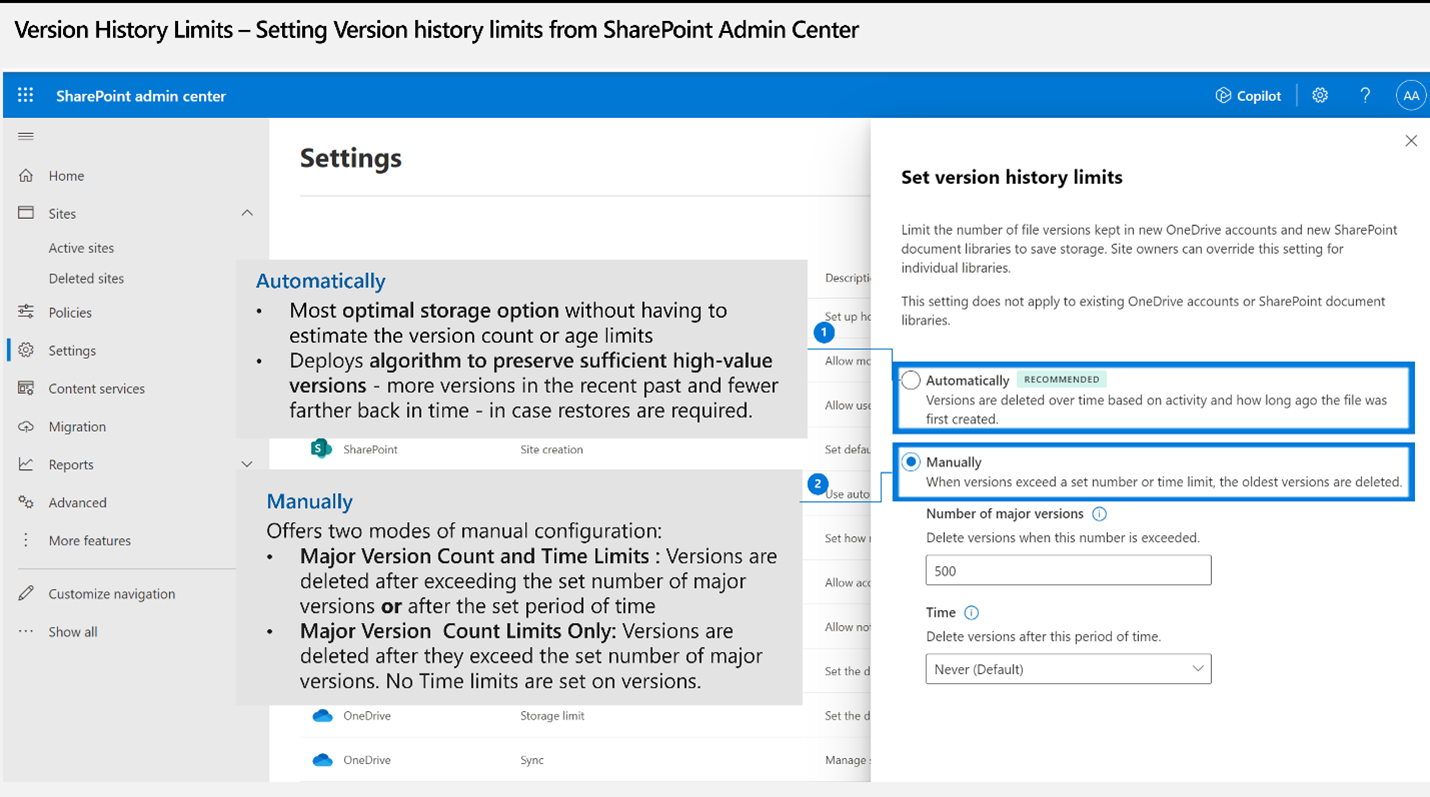
2. New Version time limit setting for Document libraries: In addition to existing Version count limits, users can set Version time limits to delete versions based on age. Version time limits will be on the library's Version settings page. No change will be made to existing version limits applied to the library.
3. New Expiring in column on a file's Version history view: Users will be able to:
- View an expiration applied to a file's versions based on the library settings
- Set individual file versions to never expire
What you need to do to prepare:
Review updated documentation:
- Admin documentation: Overview of Version History Limits for Document Libraries and OneDrive
- End user documentation: Enable and configure versioning for a list or library
To send feedback or questions about this change, select Like or Dislike at the top of this message in the Microsoft 365 message center.