🦉
Message CenterMicrosoft 365 Updates
HomePermissionsTenant FinderPortfolio
🦉
M365 Message Centerby Cengiz YILMAZ

Track the latest updates, features, and announcements for Microsoft 365 services. Comprehensive archive of service updates and important changes.

Quick Links

HomePermissionsTenant FinderPortfolio

Connect

© 2026 M365 Message Center. Created with ❤️ by Cengiz YILMAZ

Data sourced from Microsoft 365 Message Center • Not affiliated with Microsoft

  1. Home
  2. /
  3. MC783215

Microsoft OneDrive: Annotate PDFs with text boxes

Informational

Message ID

MC783215
View in Admin Center

Roadmap ID

387807
View in Roadmap

Services

SharePoint Online
OneDrive for Business

Affected Platforms

Web

Summary

Microsoft OneDrive introduces a feature for annotating PDFs with text boxes, rolling out late June to late August 2024. Users can edit PDFs in OneDrive and SharePoint by opening the file and using the 'Edit' and 'Add Text' commands. No admin action is required for this update.

Details

Updated August 13, 2024: We have updated the rollout timeline below. Thank you for your patience.

This new Microsoft OneDrive feature allows you to annotate and save PDF files with text boxes when the files are stored in Microsoft OneDrive and Microsoft SharePoint. 

This message is associated with Microsoft 365 Roadmap ID 387807

When this will happen:

General Availability (Worldwide, GCC, GCC High, DoD): We will begin rolling out late June 2024 (previously late May) and expect to complete by late August 2024 (previously late June).

How this will affect your organization:

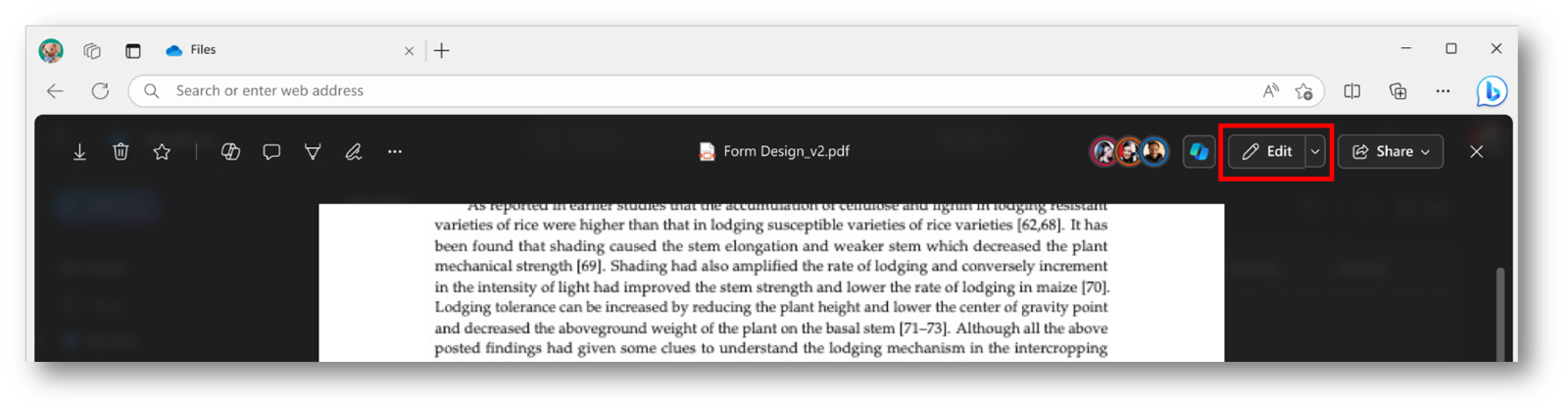
Users can access the annotation feature by opening the PDF in File Viewer and selecting Edit. To add text, follow these steps:

  1. Open the desired PDF file in OneDrive.
  2. Click Edit to enter edit mode.


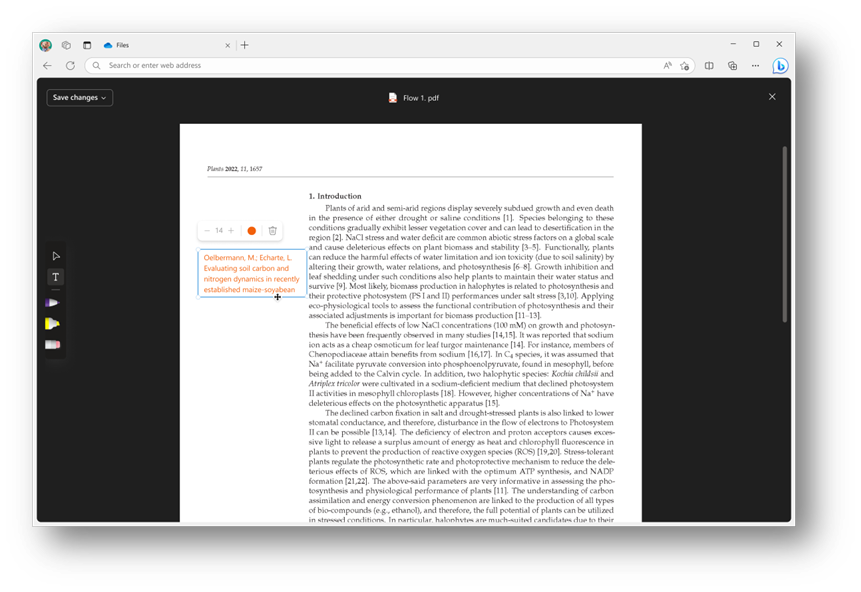
        3. Use the Add Text command on the left side of the screen to insert text.


     4. With the text box selected, you can change the color and adjust the font size using the menu above the text box.


     5. When finished, click Save changes in the top left corner to exit Edit mode and save your changes to the PDF.  

What you need to do to prepare:

This rollout will happen automatically with no admin action required. You may want to notify your users about this change and update any relevant documentation as

Timeline

📅
Published
Apr 22, 2024
Message published to Message Center
✏️
Updated
Aug 13, 2024
Message content updated
🏁
End Date
Sep 2, 2024
Message timeline ends

Tags

#Updated message#New feature#User impact

Category

📖Stay Informed

Related Messages

Similar updates

MC789209

Microsoft SharePoint document libraries: Improved Version history controls | Preview opt-in

Apr 30, 2024
MC432475

Quick Access Teams and Sharepoint Document Libraries in win32 backstage

Sep 16, 2022
MC906496

Microsoft OneDrive and Microsoft SharePoint: New setting to disable presence in the file viewer

Oct 7, 2024
MC791115

Microsoft Syntex: Sensitive information processing model

May 8, 2024
MC789318

Microsoft SharePoint: New Section Level Content Align on pages

Apr 30, 2024