🦉
Message CenterMicrosoft 365 Updates
HomePermissionsTenant FinderPortfolio
🦉
M365 Message Centerby Cengiz YILMAZ

Track the latest updates, features, and announcements for Microsoft 365 services. Comprehensive archive of service updates and important changes.

Quick Links

HomePermissionsTenant FinderPortfolio

Connect

© 2026 M365 Message Center. Created with ❤️ by Cengiz YILMAZ

Data sourced from Microsoft 365 Message Center • Not affiliated with Microsoft

  1. Home
  2. /
  3. MC785023

Microsoft Purview | Endpoint Data Loss Prevention: Enhancements to the DLP capabilities on macOS endpoints

Informational

Message ID

MC785023
View in Admin Center

Roadmap ID

389378
View in Roadmap

Services

Microsoft 365 suite

Affected Platforms

Web

Summary

Microsoft Purview | Endpoint Data Loss Prevention is enhancing DLP capabilities on macOS with context-based classification and matched condition evidence for advanced classification. Rollout begins early May 2024, completing by mid-May. No admin action needed before rollout; security teams should be informed.

Details

Coming soon for Microsoft Purview | Endpoint Data Loss Prevention: We are adding two new features to the DLP capabilities on macOS endpoints:

  1. Context-based classification
  2. Matched condition and short evidence for advanced classification

This message is associated with Microsoft 365 Roadmap ID 389378.

When this will happen:

General Availability (Worldwide): We will begin rolling out early May 2024 and expect to complete by mid-May 2024.

How this will affect your organization:

  1. Context-based classification: Admins will be able to use contextual parameters (FileType Is, FileExtension Is) as DLP policy conditions. Admin can define these parameters individually or in conjunction with content-based conditions.
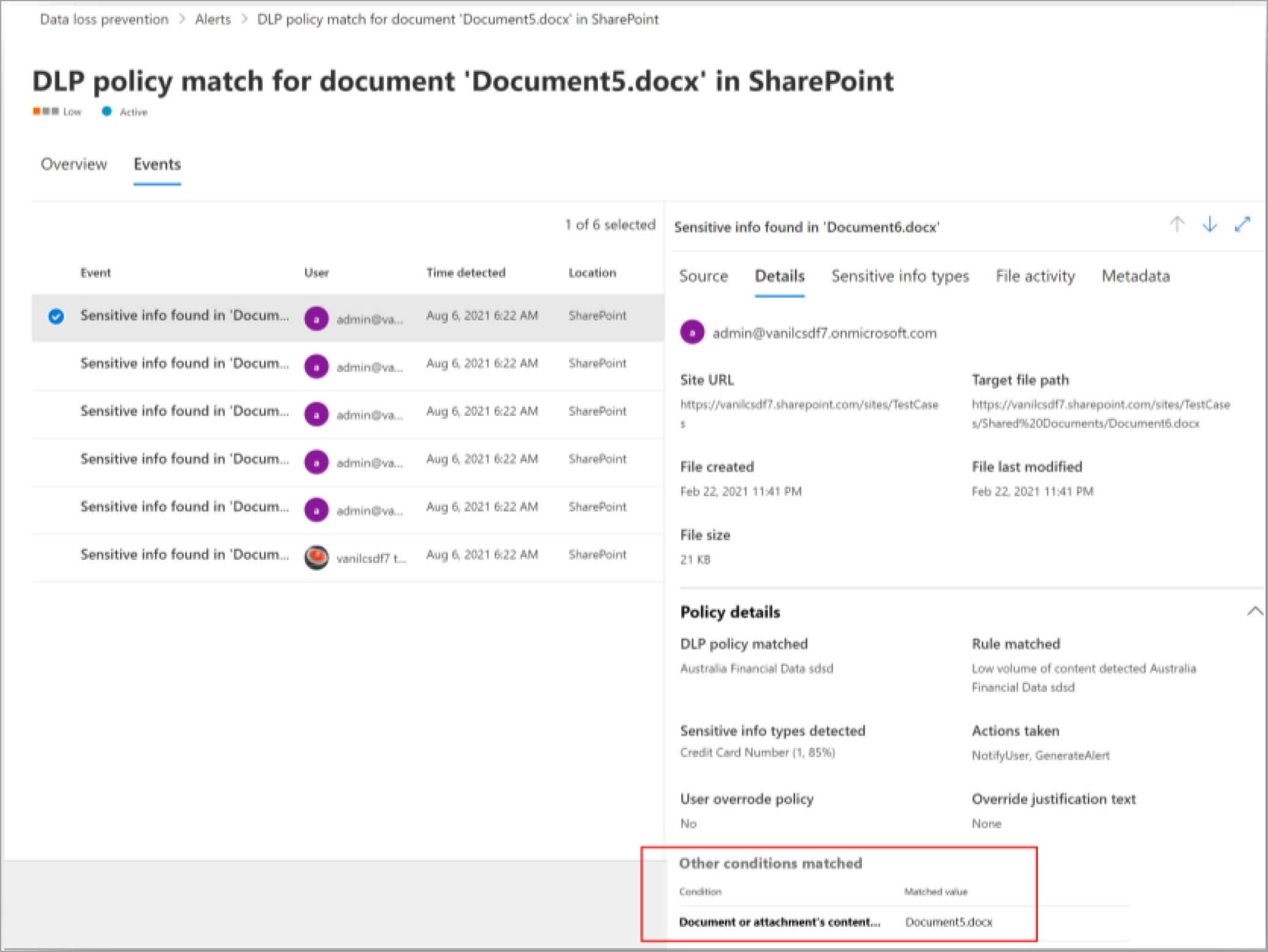
  2. Matched conditions and short evidence for advanced classification: Matched conditions show the cause of flagged DLP policy matches, providing admins with a more comprehensive investigation experience. To view this feature, go to the Alerts dashboard, select the Events tab, and then select the Details tab to review the condition and its corresponding matched value.

In the Purview compliance portal, select an event at Data Loss Prevention > Alert to review matched conditions:

admin settings

What you need to do to prepare:

This rollout will happen automatically by the specified date with no admin action required before the rollout. You may want to notify your security team about this change and update any relevant documentation as appropriate.

Learn more

  • Get started with Data Loss Prevention in the Microsoft Purview compliance portal.
  • The Microsoft Purview compliance portal
  • Learn about data loss prevention | Microsoft Learn

Timeline

📅
Published
Apr 24, 2024
Message published to Message Center
✏️
Updated
Apr 24, 2024
Message content updated
🏁
End Date
Aug 30, 2024
Message timeline ends

Tags

#New feature#Admin impact

Category

📖Stay Informed

Related Messages

Similar updates

MC791881

Purview | Data Loss Prevention: Enhanced content extraction and file type coverage for DLP on Windows devices

May 11, 2024
MC791878

Data Lifecycle Management | Enable deletion of non-empty folders under Retention policy in SharePoint and OneDrive

May 11, 2024
MC791114

Data Loss Prevention: Decoupling policy tips and email notifications for SharePoint and OneDrive

May 8, 2024
MC791110

Microsoft Purview | Data Lifecycle Management: New integration with Adaptive protection

May 8, 2024
MC791107

Microsoft Purview | Data Loss Prevention: Adaptive Protection integration will be generally available

May 8, 2024