🦉
Message CenterMicrosoft 365 Updates
HomePermissionsTenant FinderPortfolio
🦉
M365 Message Centerby Cengiz YILMAZ

Track the latest updates, features, and announcements for Microsoft 365 services. Comprehensive archive of service updates and important changes.

Quick Links

HomePermissionsTenant FinderPortfolio

Connect

© 2026 M365 Message Center. Created with ❤️ by Cengiz YILMAZ

Data sourced from Microsoft 365 Message Center • Not affiliated with Microsoft

  1. Home
  2. /
  3. MC761235

Microsoft Teams Phone devices: Enable call forwarding directly from the device's Home screen

Informational

Message ID

MC761235
View in Admin Center

Roadmap ID

388490
View in Roadmap

Services

Microsoft Teams

Affected Platforms

TeamsAndSurfaceDevices

Summary

Microsoft Teams certified phone devices will soon allow users to enable call forwarding directly from the device's Home screen. Admins can enable call forwarding through Teams admin center or on the Teams phone device. Users should ensure their Teams phone devices are updated with the latest application to access the new feature. Rollout will begin in early May 2024 and complete by late May 2024 for worldwide GCC, and late June 2024 to late July 2024 for GCC High. If your organization does not use Teams phone devices, disregard this message. Learn more at the Microsoft Community Hub.

Details

Note: If your organization does not use Teams phone devices, you can disregard this message.

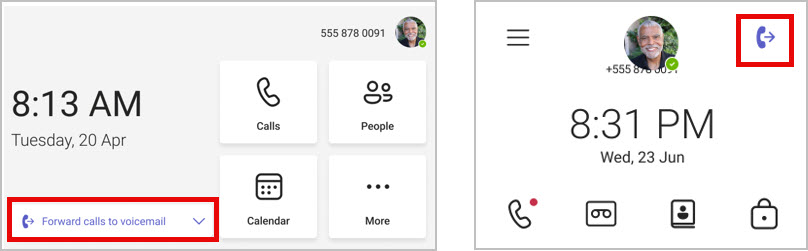
Coming soon: Users of Microsoft Teams certified phone devices will be able to enable call forwarding directly from a Teams phone device Home screen with just a few clicks. The feature will be supported on both personal and common area phones, including touch and non-touch phones.

This message is associated with Microsoft 365 Roadmap ID 388490.

When this will happen:

General Availability (Worldwide, GCC): We will begin rolling out early May 2024 and expect to complete by late May 2024.

GCC High: We will begin rolling out late June 2024 and expect to complete by late July 2024.

How this will affect your organization:

Enabling call forwarding from a Teams phone device Home screen:

user controls

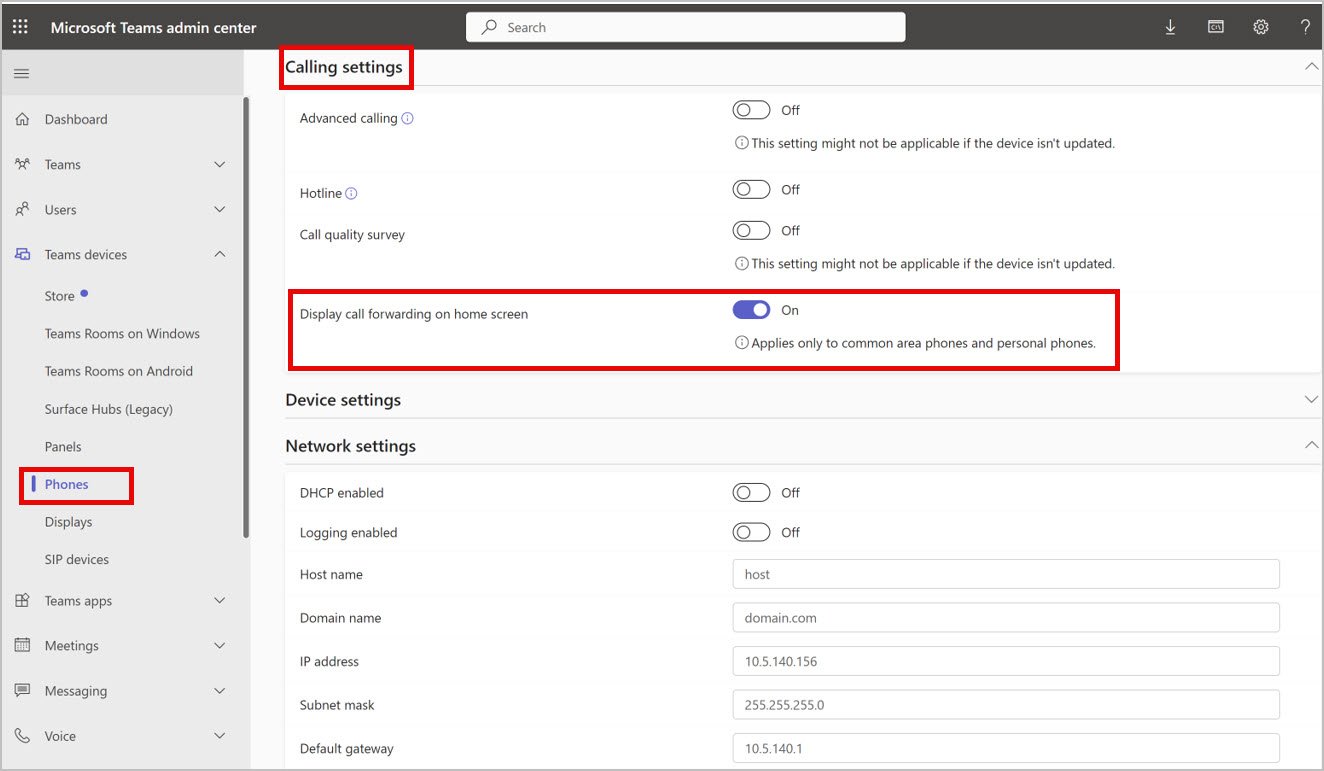
As admins, you will be able to enable call forwarding on the Home screen for your users through Teams admin center > Teams devices > Phones > configuration profile > Calling settings or on the Teams phone device through Calling settings.

admin controls

What you need to do to prepare:

Please ensure your Teams phone devices are updated with the latest application from the Teams admin center to get access to the new feature.

This rollout will happen automatically by the specified date with no admin action required. You may want to notify your users and admins about this change and update any relevant documentation as appropriate.

Learn more: What's New in Microsoft Teams | Enterprise Connect 2024 Edition - Microsoft Community Hub.

Timeline

📅
Published
Mar 29, 2024
Message published to Message Center
✏️
Updated
Mar 29, 2024
Message content updated
🏁
End Date
Sep 13, 2024
Message timeline ends

Tags

#Feature update#User impact#Admin impact

Category

📖Stay Informed

Related Messages

Similar updates

MC772558

Microsoft Teams: Meeting recordings are now saved in organizer's Microsoft OneDrive

Apr 8, 2024
MC772556

Microsoft Teams: Shorter meeting URLs

Apr 8, 2024
MC762504

Microsoft Teams Phone devices: Redirect incoming calls directly to voicemail from incoming call notifications

Mar 30, 2024
MC761251

Microsoft Teams: Direct Media Connection cmdlet

Mar 29, 2024
MC761227

Microsoft Teams Phone devices: Advanced calling and contact management on non-touch phones

Mar 29, 2024