🦉
Message CenterMicrosoft 365 Updates
HomePermissionsTenant FinderPortfolio
🦉
M365 Message Centerby Cengiz YILMAZ

Track the latest updates, features, and announcements for Microsoft 365 services. Comprehensive archive of service updates and important changes.

Quick Links

HomePermissionsTenant FinderPortfolio

Connect

© 2026 M365 Message Center. Created with ❤ by Cengiz YILMAZ

Data sourced from Microsoft 365 Message Center • Not affiliated with Microsoft

  1. Home
  2. /
  3. MC740508

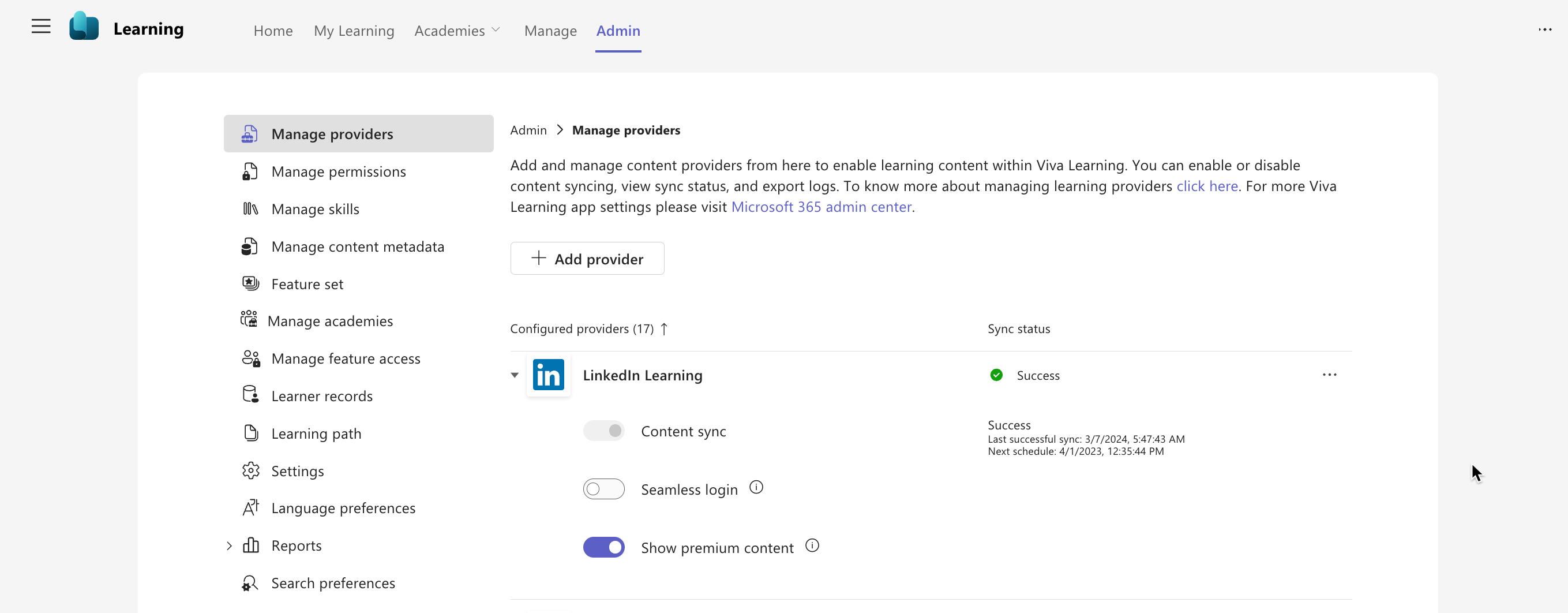
Microsoft Viva Learning: Disable LinkedIn Learning premium content

Informational

Message ID

MC740508
View in Admin Center

Services

Microsoft Viva

Summary

We are currently evaluating the rollout timeline and will communicate via Message center when we are ready to proceed. Microsoft Viva Learning is rolling out a feature for admins to disable LinkedIn Learning premium content in Viva Learning for all users in their tenant. This rollout does not affect any existing Viva Learning functionality or configuration, and there is no impact for end-users in Viva Learning. To turn off LinkedIn Learning premium content, go to Viva Learning Admin > Manage Providers > LinkedIn Learning. No action is needed to prepare for this rollout.

Details

Updated June 28, 2024: We are evaluating the current rollout timeline and will communicate via Message center when we are ready to proceed. Thank you for your patience.

We are rolling out a feature for admins to turn off LinkedIn Learning premium content in Microsoft Viva Learning for all users in their tenant. (LinkedIn Learning premium content is on by default in Viva Learning for all tenants.)

When this will happen:

General Availability (Worldwide): We are evaluating the current rollout timeline and will communicate via Message center when we are ready to proceed. Thank you for your patience.

How this will affect your organization:

This rollout does not change any existing Viva Learning functionality or configuration. There is no impact for end users in Viva Learning. If hidden, end users will not be able to browse for LinkedIn Learning premium content.

To turn off LinkedIn Learning premium content: Viva Learning Admin > Manage Providers > LinkedIn Learning

admin controls

What you need to do to prepare:

No action is needed from you to prepare for this rollout. You may want to notify your users about this change and update any relevant documentation as appropriate.

Timeline

Published
Mar 15, 2024
Message published to Message Center
Updated
Jun 28, 2024
Message content updated
End Date
Sep 30, 2024
Message timeline ends

Tags

#Updated message#New feature#Admin impact

Category

Stay Informed

Related Messages

Similar updates

MC740505

Viva Learning | New language settings for admins and users

Mar 15, 2024
MC740504

Microsoft Viva Learning | Easily switch across Viva Learning Teams app and Webapp

Mar 15, 2024
MC781589

Managing Microsoft Viva Engage no longer requires the assignment of a Microsoft 365 license seat

Apr 19, 2024
MC715691

Microsoft Viva Admin center: New capabilities for added flexibility and to manage adoption

Feb 14, 2024
MC715420

Microsoft Viva Glint: Use Microsoft 365 admin center to assign your organization's Viva Glint admins

Feb 13, 2024