๐Ÿฆ‰
Message CenterMicrosoft 365 Updates
HomePermissionsTenant FinderPortfolio
๐Ÿฆ‰
M365 Message Centerby Cengiz YILMAZ

Track the latest updates, features, and announcements for Microsoft 365 services. Comprehensive archive of service updates and important changes.

Quick Links

HomePermissionsTenant FinderPortfolio

Connect

ยฉ 2026 M365 Message Center. Created with โค๏ธ by Cengiz YILMAZ

Data sourced from Microsoft 365 Message Center โ€ข Not affiliated with Microsoft

  1. Home
  2. /
  3. MC715427

Microsoft Project for the web: New Assigned to Me view for Project tasks

Plan for Change
Major Change

Message ID

MC715427
View in Admin Center

Roadmap ID

382207
View in Roadmap

Services

Planner
Project for the web

Affected Platforms

Web

Summary

Microsoft Project for the web will have a new "Assigned to Me" view for tasks, allowing users to access and edit their Project tasks in Planner, To Do, and Teams. The rollout will begin mid-March 2024 and end late May 2024. Project tasks will be synced with Planner, but users can turn off this feature in the Microsoft 365 admin center if they don't want Project data to cross data boundaries. No action is needed to enable the feature.

Details

Updated March 15, 2024: We have updated the rollout timeline below. Thank you for your patience.

The Assigned to me view in Microsoft Planner, Microsoft To Do, and the Microsoft Teams Task app currently displays all Microsoft 365 tasks assigned to the user, except for Project on the web tasks. With this release, users can access and edit their Project on the web tasks in the Assigned to me view of Planner, To Do, and the Teams task app.

This message is associated with Microsoft 365 Roadmap ID 382207.

When this will happen:

Standard Release: We will begin rolling out mid-March 2024 (previously early March) and expect to complete by late May 2024 (previously mid-May). 

How this will affect your organization:

As part of this feature, Project on the web tasks will be synced with Planner. If your Project for web and Planner are in two different data boundaries and you don't want Project on the web data to cross the data boundary, you can choose to turn off this feature for your tenant.

What you need to do to prepare:

If you want to enable this feature for users in your tenant, you don't have to do anything. The feature will be on by default.

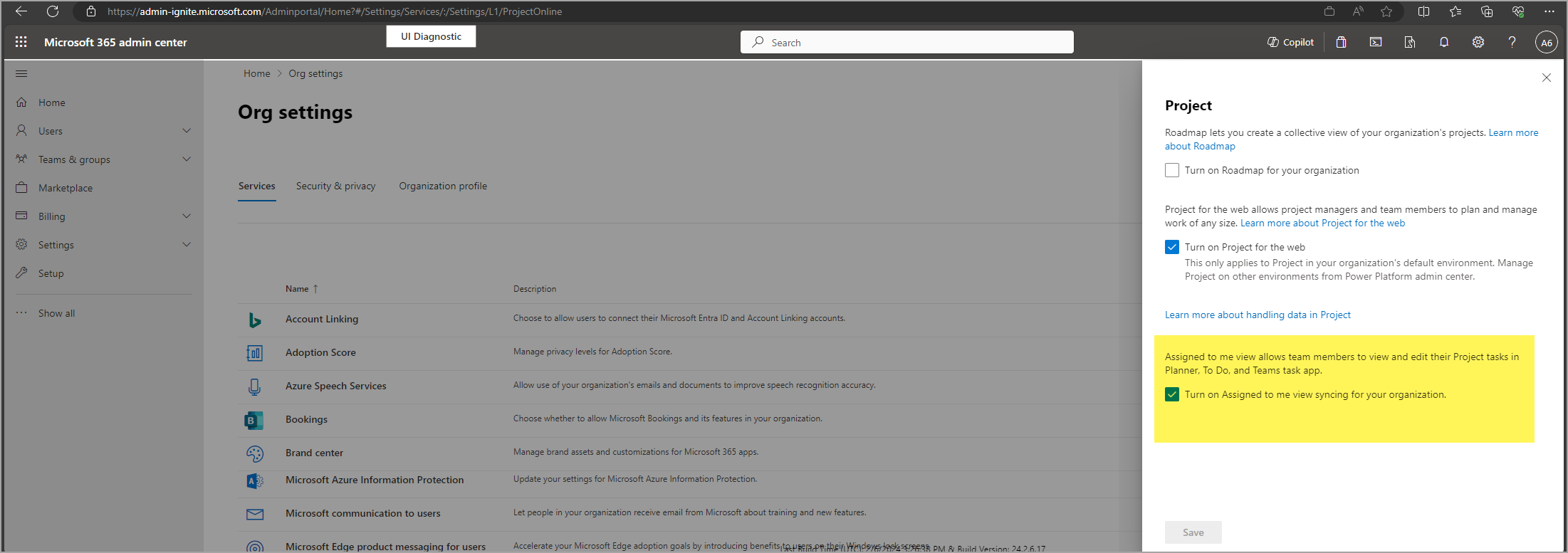
You can turn off this feature before March 6, 2024 by unchecking the box for Assigned to me in the Microsoft 365 admin center.

admin center settings

Timeline

๐Ÿ“…
Published
Feb 13, 2024
Message published to Message Center
โš ๏ธ
Action Required By
Mar 6, 2024
Action deadline
โœ๏ธ
Updated
Mar 15, 2024
Message content updated
๐Ÿ
End Date
Jul 1, 2024
Message timeline ends

Tags

#Updated message#New feature#User impact#Admin impact

Category

๐Ÿ“‹Plan for Change

Related Messages

Similar updates

MC910987

Microsoft Project for web: Roadmap admin toggle | Microsoft Planner: New Portfolios feature

Oct 14, 2024
MC718248

The new Microsoft Planner app in Microsoft Teams

Feb 21, 2024
MC1191342

Microsoft Planner: Support for Microsoft Information Protection (MIP) content sensitivity labels

Dec 1, 2025
MC1122155โ—

Project Manager Agent รขโ‚ฌโ€œ SP site grounding

Jul 25, 2025
MC1068905โ—

Microsoft Project for the web and Project in Teams will retire and redirect to Planner for the web and Planner in Teams

May 6, 2025