🦉
Message CenterMicrosoft 365 Updates
HomePermissionsTenant FinderPortfolio
🦉
M365 Message Centerby Cengiz YILMAZ

Track the latest updates, features, and announcements for Microsoft 365 services. Comprehensive archive of service updates and important changes.

Quick Links

HomePermissionsTenant FinderPortfolio

Connect

© 2026 M365 Message Center. Created with ❤ by Cengiz YILMAZ

Data sourced from Microsoft 365 Message Center • Not affiliated with Microsoft

  1. Home
  2. /
  3. MC710212

Microsoft Teams: In form meeting option updates for webinars and townhalls

Informational

Message ID

MC710212
View in Admin Center

Roadmap ID

373420
View in Roadmap

Services

Microsoft Teams

Affected Platforms

DesktopMacWeb

Summary

Microsoft Teams will now allow users to configure meeting options for webinars and townhalls within the app before event creation, instead of being taken to a web page. The change will be rolled out in early February 2024 and is expected to be completed by late April 2024. No action is needed to prepare for this change.

Details

Updated April 19, 2024: We have updated the rollout timeline below. Thank you for your patience.

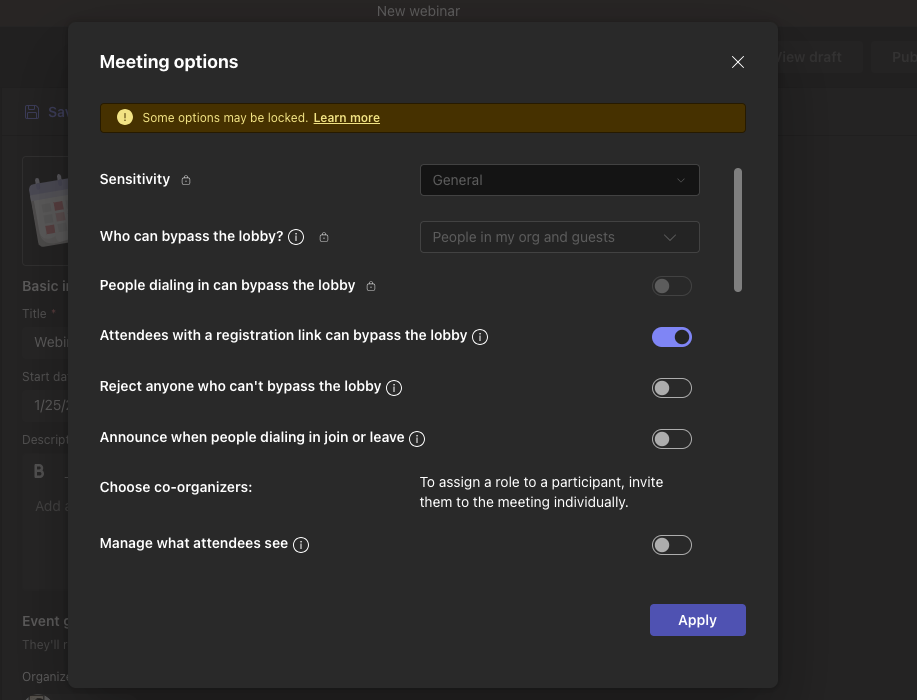
In Microsoft Teams, configuring meeting options for events like webinars and townhalls required users to be taken to a web page after the event had been created. In order to optimize the user experience, we will now allow users to configure meeting options within the Teams app before event creation. This will provide users with more flexibility.

This message is associated with Microsoft 365 Roadmap ID 373420

When this will happen:

Targeted release: We will begin rolling out early February 2024 and expect to complete by mid-February 2024.

Worldwide and GCC: We will begin rolling out mid-February 2024 and expect to complete by late April 2024 (previously early April).

How this will affect your organization:

Webinar and townhall organizers will no longer be sent to a web page to edit their event's meeting options. The meeting options will now show up as an inline window within the scheduling form. This will occur for both the create and edit experiences.


What you need to do to prepare:

There is no action needed to prepare for this change. You may want to notify your users about this change and update any relevant documentation as appropriate.

Timeline

Published
Jan 26, 2024
Message published to Message Center
Updated
Apr 19, 2024
Message content updated
End Date
Jun 30, 2024
Message timeline ends

Tags

#Updated message#Feature update#User impact

Category

Stay Informed

Related Messages

Similar updates

MC705760

Teams: Latest meeting experiences with performance improvements on web for Safari and Firefox (for guests)

Jan 10, 2024
MC707674

Microsoft Teams: Tags will be supported in Private Channels

Jan 17, 2024
MC707648

Microsoft Teams: Private and shared channels links

Jan 17, 2024
MC707670

Tags in Shared Channels for Microsoft Teams

Jan 17, 2024
MC710211

Microsoft Teams: Reordering registration form questions for webinars

Jan 26, 2024