🦉
Message CenterMicrosoft 365 Updates
HomePermissionsTenant FinderPortfolio
🦉
M365 Message Centerby Cengiz YILMAZ

Track the latest updates, features, and announcements for Microsoft 365 services. Comprehensive archive of service updates and important changes.

Quick Links

HomePermissionsTenant FinderPortfolio

Connect

© 2026 M365 Message Center. Created with ❤️ by Cengiz YILMAZ

Data sourced from Microsoft 365 Message Center • Not affiliated with Microsoft

  1. Home
  2. /
  3. MC700933

Immersive spaces available for General Availability

Informational

Message ID

MC700933
View in Admin Center

Roadmap ID

161720
View in Roadmap

Services

Microsoft 365 suite
Microsoft Teams

Affected Platforms

Desktop

Summary

Immersive spaces are now available for General Availability in Microsoft Teams, allowing users to transform virtual meetings into 3D experiences with just one click. The feature is available on Windows PC or Meta Quest VR devices, with certain license requirements and PC specifications. The rollout will begin in late January 2024 and be completed by late April 2024. Classic Teams (Teams 1.0) will not support the feature. Mesh Immersive spaces app can be managed via the Microsoft Teams Admin Center.

Details

Updated April 15, 2024: We have updated the rollout timeline below. Thank you for your patience.

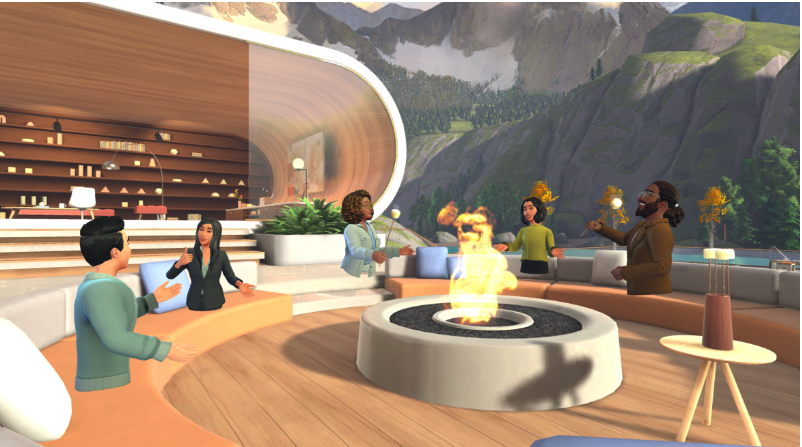
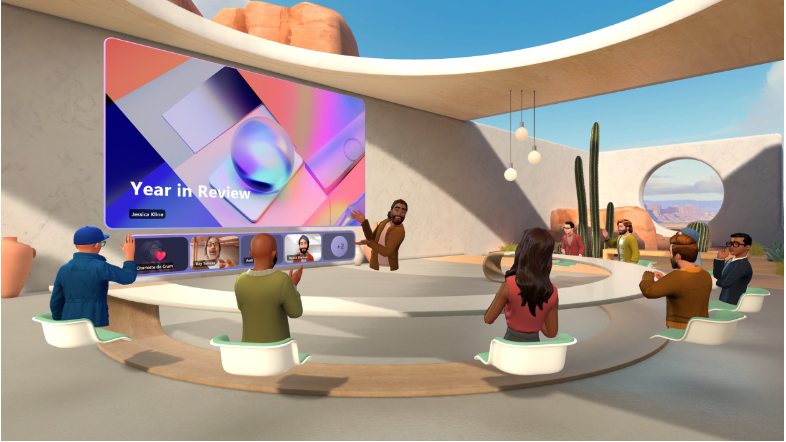
We are making building relationships easier by bringing the power of Mesh into the place where people work every day—Microsoft Teams. With just one click, you can now easily transform your virtual meeting into a fun 3D experience with immersive spaces in Microsoft Teams. 


This message is associated with Microsoft 365 Roadmap ID 161720

When this will happen:

Preview: This rolled out in October 2023.

We will begin rolling out in late January 2024 and will be completed by late April 2024 (previously mid-March).

How this will affect your organization:

Requirements

This feature is available in Microsoft Teams on Windows PC or on Meta Quest VR devices. Immersive spaces participants can connect with anyone in the Teams meeting.

PC requires 4 cores and 8 GB RAM to enable the option and access immersive spaces. 

License Requirement 

This will be available to the following licenses:

  • Teams Essentials
  • Microsoft 365 Business Basic
  • Microsoft 365 Business Standard
  • Microsoft 365 Business Premium
  • Microsoft 365 E3/E5
  • Office 365 E1/E3/E5. 

Current limitations 

We will not support classic Teams (i.e., Teams 1.0). You need to use new Teams (i.e., Teams 2.1) to see the “immersive space” option. 


 What you need to do to prepare:

The Mesh Immersive spaces app in Teams can be managed via the Microsoft Teams Admin Center. Learn more about how to manage apps in the Microsoft Teams admin center.

Timeline

📅
Published
Dec 22, 2023
Message published to Message Center
✏️
Updated
Apr 15, 2024
Message content updated
🏁
End Date
Jun 3, 2024
Message timeline ends

Tags

#Updated message#Feature update#User impact#Admin impact

Category

📖Stay Informed

Related Messages

Similar updates

MC709659

Microsoft Purview | Information Protection: Sensitivity labels to discover private teams and protect shared channels

Jan 24, 2024
MC889528

Microsoft Teams apps and Microsoft Copilot extensions: New security and certification information

Sep 13, 2024
MC855701

Microsoft Teams: Updated network setup requirements for immersive spaces

Aug 8, 2024
MC791597

Microsoft Teams: Avatars wardrobe updates available soon

May 9, 2024
MC789315

Microsoft Teams: Create avatars from photo

Apr 30, 2024