🦉
Message CenterMicrosoft 365 Updates
HomePermissionsTenant FinderPortfolio
🦉
M365 Message Centerby Cengiz YILMAZ

Track the latest updates, features, and announcements for Microsoft 365 services. Comprehensive archive of service updates and important changes.

Quick Links

HomePermissionsTenant FinderPortfolio

Connect

© 2026 M365 Message Center. Created with ❤ by Cengiz YILMAZ

Data sourced from Microsoft 365 Message Center • Not affiliated with Microsoft

  1. Home
  2. /
  3. MC687207

Microsoft Teams: Files App Updating to OneDrive App Experience in Teams

Informational

Message ID

MC687207
View in Admin Center

Roadmap ID

145798
View in Roadmap

Services

Microsoft Teams

Affected Platforms

Desktop

Details

Updated February 2, 2024: We have updated the rollout timeline below. Thank you for your patience.

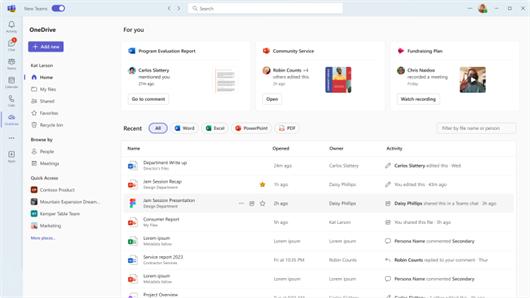
The Files app accessed from the left side of the Teams desktop client will be updated with the new OneDrive app experience, bringing performance improvements, more views, and the latest features of OneDrive to both classic and new Teams. All existing features of the Files app will also be available via this new OneDrive app experience. For more details, please visit the blog page.

As part of this change, Files app on left side of the new Teams desktop client will also become OneDrive app. There is no change in the name of Files app in either classic Teams desktop client or Teams mobile client.

This message is associated with Microsoft 365 Roadmap ID 145798

When this will happen:

Targeted Release: We will begin rolling out in mid-November 2023 and expect to complete rollout by late November 2023.

Standard Release: We will begin rolling out in late November 2023 and expect to complete rollout by mid-February 2024 (previously late January).

How this will affect your organization:

Additionally, for Teams desktop users, a one-time indication will be shown for awareness when Files app is updated to OneDrive app. 
   

What you need to do to prepare:

There is no action required since any existing policies or settings done through Teams Admin Center for Files app will automatically be applicable.

Timeline

Published
Nov 3, 2023
Message published to Message Center
Updated
Feb 2, 2024
Message content updated
End Date
Mar 25, 2024
Message timeline ends

Tags

#Updated message#Feature update#User impact#Admin impact

Category

Stay Informed

Related Messages

Similar updates

MC690922

Microsoft Teams: Updates to in-call user experience.

Nov 17, 2023
MC695502

IntelliFrame experiences on new Teams app and Recognition expansion

Dec 4, 2023
MC674737

Microsoft Teams: Emojis, GIFs and Stickers Unified in One Picker

Sep 11, 2023
MC700933

Immersive spaces available for General Availability

Dec 22, 2023
MC665936

Device Management Changes for Microsoft Teams Android Devices (Intune AOSP migration)

Aug 8, 2023