🦉
Message CenterMicrosoft 365 Updates
HomePermissionsTenant FinderPortfolio
🦉
M365 Message Centerby Cengiz YILMAZ

Track the latest updates, features, and announcements for Microsoft 365 services. Comprehensive archive of service updates and important changes.

Quick Links

HomePermissionsTenant FinderPortfolio

Connect

© 2026 M365 Message Center. Created with ❤️ by Cengiz YILMAZ

Data sourced from Microsoft 365 Message Center • Not affiliated with Microsoft

  1. Home
  2. /
  3. MC678068

Introducing Left Navigation Customization on Microsoft365.com

Informational

Message ID

MC678068
View in Admin Center

Services

Microsoft 365 suite
Microsoft 365 for the web
Microsoft 365 apps

Details

Updated January 9, 2024: We have updated the rollout timeline below. Thank you for your patience.

We are excited to announce a new feature that will allow individuals to customize the apps on the left navigation on microsoft365.com. This feature will give individuals more control and flexibility over the apps they use and access frequently.

When this will happen:

We will begin rolling this feature out in early October 2023 and will complete by late March 2024 (previously late January).

How this will affect your organization:

As part of this feature, the current set of default apps on the app bar will be removed and users will be presented with an experience allowing them to pin the specific apps they want. Users will be able to add and remove apps to the left navigation from the Apps page at Microsoft365.com/apps. Admins will not be able to manage or override the user's app choices.
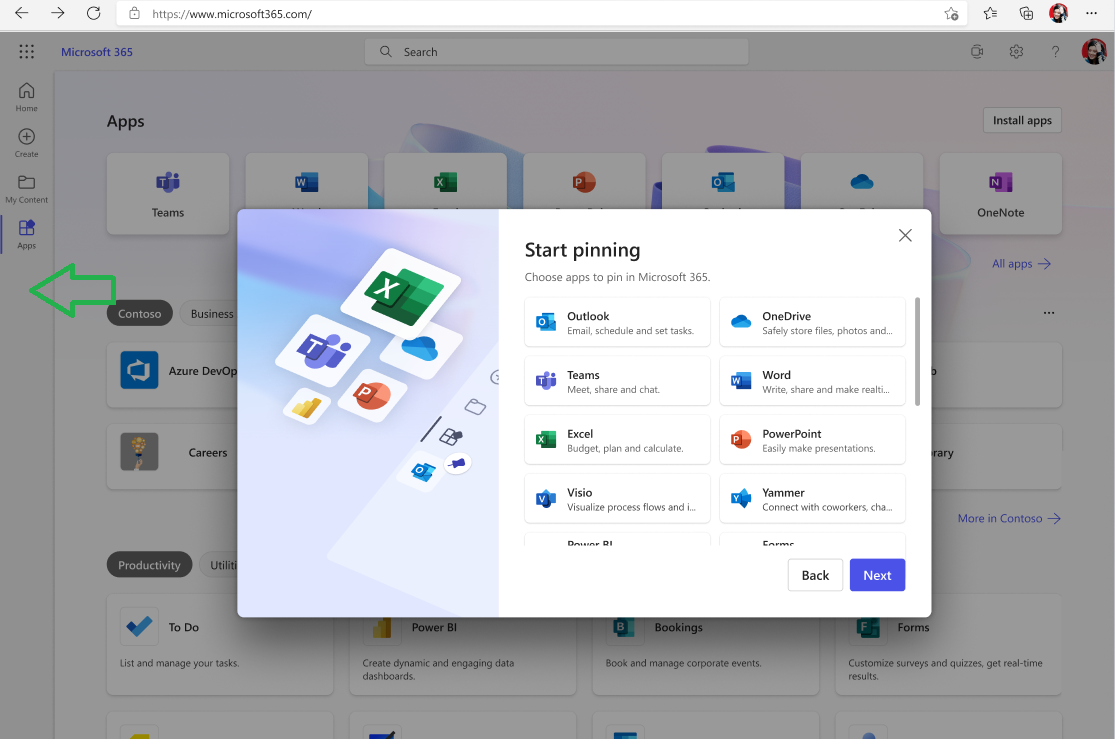
pin apps

What you need to do to prepare:

No required preparation for this change. Training and documentation may need to be updated as appropriate.

Timeline

📅
Published
Sep 28, 2023
Message published to Message Center
✏️
Updated
Jan 9, 2024
Message content updated
🏁
End Date
Apr 29, 2024
Message timeline ends

Tags

#Updated message#Feature update#User impact#Admin impact

Category

📖Stay Informed

Related Messages

Similar updates

MC1041179

Microsoft Viva Engage: Monitoring keywords in the new Communications Dashboard

Mar 25, 2025
MC805215

Microsoft Clipchamp: The brand kit feature is rolling out with extended elements to all users

Jun 25, 2024
MC744123

Microsoft Clipchamp desktop app: Work account support

Mar 18, 2024
MC690179

Outlook Folder Recursive Search

Nov 15, 2023
MC692758

Catch Up Improvements on Web

Nov 23, 2023