Updated November 27, 2023: We have updated the rollout timeline below. Thank you for your patience.
Set your work location for the day in Microsoft Teams so your team can learn about your availability for in-office and remote collaboration.
This message is associated with Microsoft 365 Roadmap ID 125375
When this will happen:
Targeted Release and Preview: We have begun rollout and expect to complete rollout by late May.
Standard Release: We will begin rolling out in early June 2023 and expect to complete rollout by late January 2024 (previously early November).
How this will affect your organization:
We are highlighting Microsoft 365 features that will bring transparency and focus on where you and your colleagues are working: work hours and location. These features will appear in Outlook on the web and Teams and bring the flexibility of enabling users to share where they are working. You’re already accustomed to managing and sharing your schedule in Outlook and Teams. With these additional features, Microsoft 365 is now location-aware – giving more information to you and colleagues to work better together.
Microsoft 365 already helps you manage and share your work schedule and availability. The work hours and location features allow you to specify more details about your work schedule and preferences, like from where you’re working (remotely or in office) and whether you work different hours on different days.
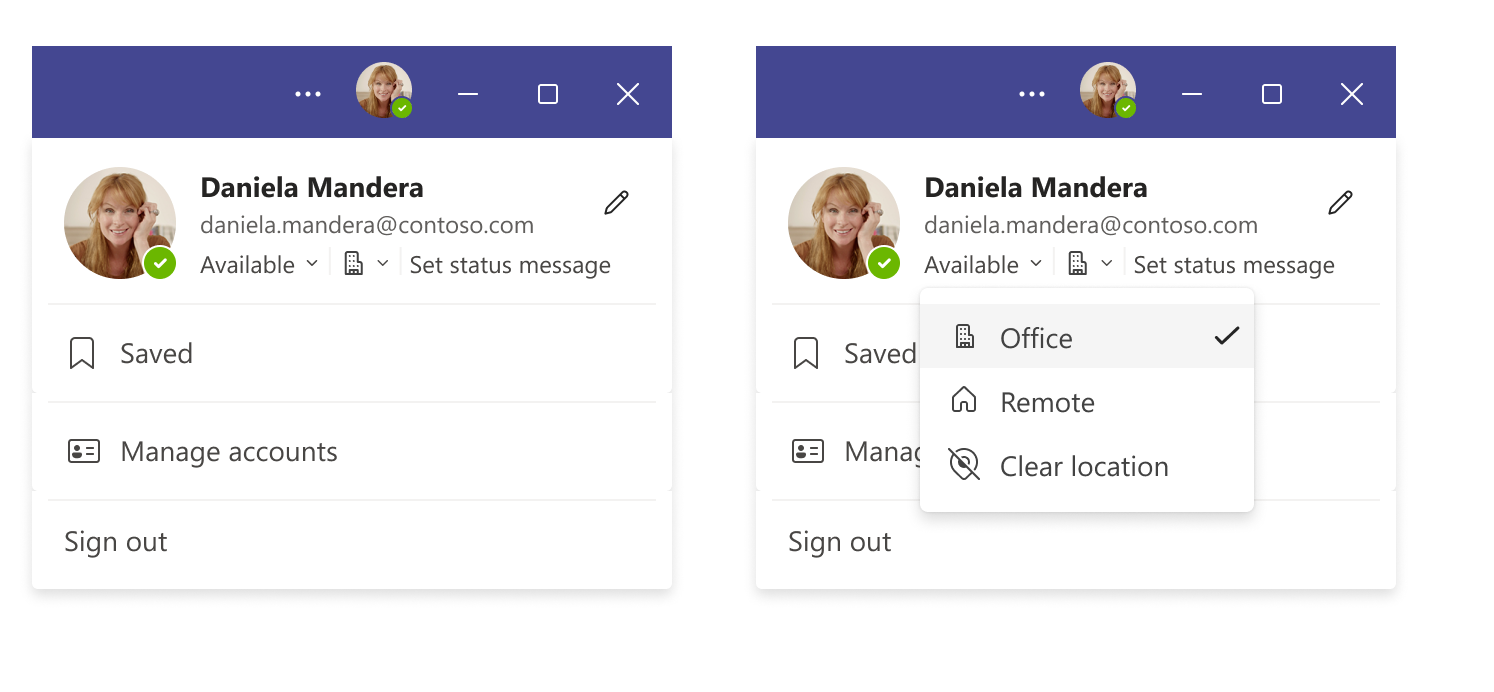
Teams gives you the flexibility to easily change the location for that day, without impacting the rest of your week. For example, after a few hours in the office, you decide to finish up your work from home. To change your location from Teams, simply click on your profile on the top right corner of the Teams window, view your account settings menu and change your work location for that day.
You can also update your location from any device with Teams. If you want to quickly look up where someone is working from, you can view their location in their profile card next to their availability.
What you need to do to prepare:
There is no action required from you at this time. You may want to notify your users of this update.