What and Why:
Microsoft is introducing a new My Sites tab in the OneDrive for iOS app that provides users with a centralized view of all group-connected SharePoint sites they own or belong to. This enhancement improves personal and team productivity by making it easier to discover and access team content without relying on recent activity, search, or remembering site names. Users can quickly navigate to site document libraries directly from their iPhone or iPad, helping reduce time spent locating content and improving access to newly joined sites.
Rollout Schedule:
- General Availability (Worldwide): Rollout begins in mid-July 2026 and is expected to complete by August 2026.
Impact on Your Organization:
Who is affected:
- Users who access OneDrive on iOS (iPhone and iPad).
- Users who are members or owners of group-connected SharePoint sites.
- Microsoft 365 tenants using SharePoint Online and OneDrive.
Platforms/Services:
- OneDrive for iOS
- SharePoint Online
- Microsoft 365
What will happen:
- Users will see a new My Sites tab within the OneDrive iOS application.
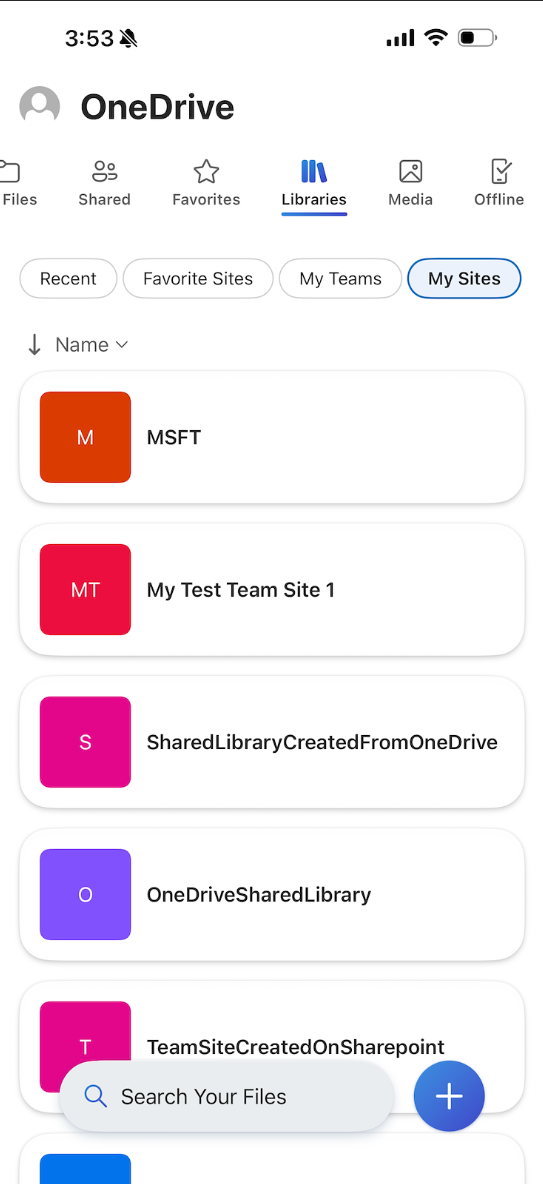
- The tab will display all group-connected SharePoint sites where the user is an owner or member.
- Users can browse sites even if they have not recently accessed them.
- Newly added site memberships will become easier to discover.
- Selecting a site will open its default document library.
- The feature is enabled by default as part of the OneDrive iOS experience.
- No changes are being made to SharePoint site permissions or membership management.
- No tenant-level configuration or policy changes are required.
Action Required/Recommendations:
No admin action is required.
We recommend that you:
- Review the updated user experience before rollout.
- Inform iOS users about the new My Sites navigation experience.
- Update internal OneDrive or SharePoint training materials if applicable.
- Prepare help desk teams to answer questions regarding the new location for accessing SharePoint sites.
Compliance Considerations:
No compliance considerations identified, review as appropriate for your organization.