Updated August 11, 2026: We have updated the timeline. Thank you for your patience.
What and Why
Microsoft is introducing support for FTP and SFTP in Endpoint data loss prevention (DLP) in Microsoft Purview. This capability helps organizations monitor and protect sensitive data transferred using FTP and SFTP from managed Windows devices. It prevents unauthorized data exfiltration while maintaining visibility and control and closes a gap in protection across common transfer methods.
Rollout Schedule
- Public Preview: Beginning early September 2026 (previously late July) and expected to complete by end of September 2026 (previously early August)
- General Availability (Worldwide, GCC, GCC High, and DoD): Beginning and completing October 2026 (previously mid-August)
Impact on Your Organization
Who is affected
- Admins managing Microsoft Purview Endpoint DLP
- Users on managed Windows devices
Platforms/Services
- Microsoft Purview
- Endpoint DLP
- Windows devices
What will happen
- Endpoint DLP will support monitoring and protection of files transferred over FTP and SFTP.
- FTP and SFTP events will appear as a new activity type in Activity Explorer.
- Admins can apply DLP actions such as audit, block, and block with override to FTP and SFTP transfer activities after enabling the capability in policy settings:
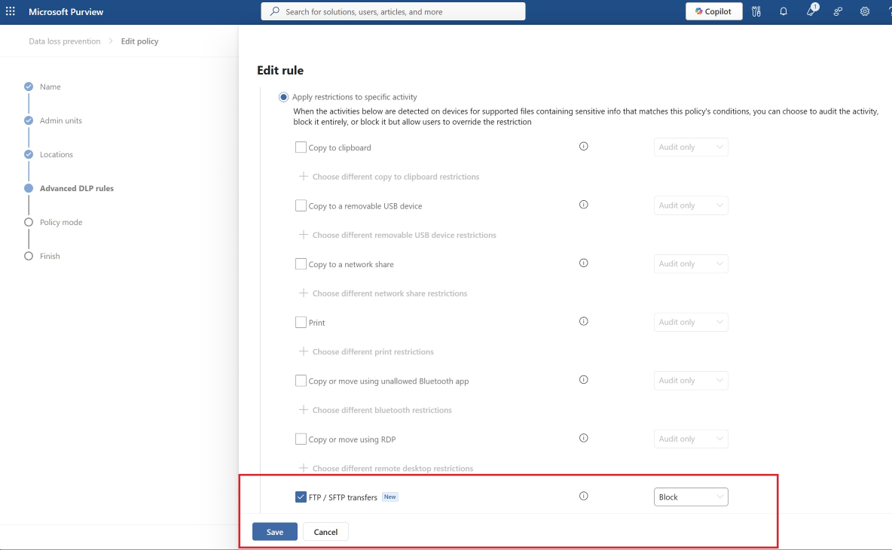
- FTP and SFTP protection is not enabled by default. Administrators must configure FTP/SFTP transfer activities in Endpoint DLP policies to apply protection.
- Once enabled, FTP and SFTP transfer activities are evaluated using the conditions, scope, and enforcement actions configured in Endpoint DLP policies.
Action Required / Recommendations
No immediate action is required before rollout.
Recommended actions:
- Review your existing Endpoint DLP policies for devices.
- Identify where FTP and SFTP transfer protection should be applied.
- Start with audit only mode before enabling blocking actions.
- Use Activity Explorer to monitor FTP and SFTP events after rollout.
- Refine policies based on observed activity.
Learn more:
Compliance Considerations
This change extends existing Endpoint DLP policy enforcement to additional data transfer channels and may affect how sensitive data movement is monitored and controlled across endpoints. Review as appropriate for your organization.