Updated July 30, 2026: We have updated the timeline. Thank you for your patience.
What and Why
We are introducing Copilot‑generated suggested edits in Copilot Pages to help users improve the clarity and quality of their content without leaving their workflow. This enhancement brings AI‑powered writing feedback directly into the page experience, enabling users to review and apply actionable suggestions in context. This aligns with our goal to improve personal and team productivity by helping users create higher‑quality content more efficiently.
This message is associated with Microsoft 365 Roadmap ID 562351.
Rollout Schedule
- Frontier: We will begin rolling out to Frontier Private and Public in early June 2026.
- General Availability (Worldwide): We will begin rolling out end of August 2026 (previously late July) and expect to complete by mid-September 2026 (previously early August).
Impact on Your Organization
Who is affected
Users with access to Microsoft 365 Copilot and Copilot Pages
Platforms/Services
- Copilot Pages (web)
- Microsoft 365 Copilot
What will happen
- Users can request writing feedback directly within Copilot Pages using Copilot Shortcuts or Copilot Chat.
- A new Suggest edits option will be available:
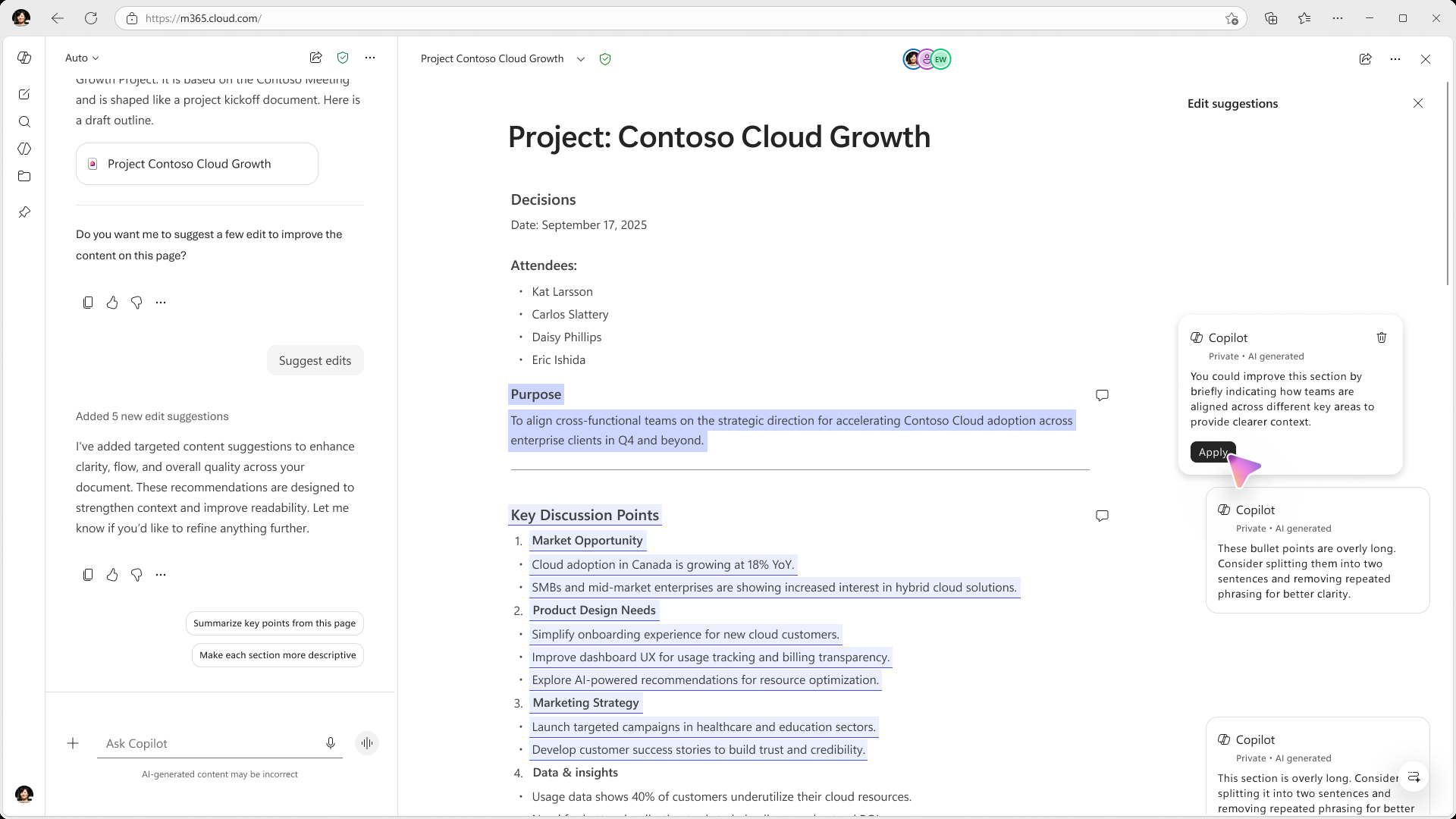
- Copilot analyzes page content and generates suggestions to improve clarity and writing quality.
- Suggestions appear as comment-like cards in a right-hand sidebar aligned to relevant content.
- Each suggestion can be applied with a single click using an Apply button.
- The feature is available by default to eligible users; no additional configuration is required.
- Existing Copilot policies and permissions are respected.
Action Required / Recommendations
No action is required.
Admins may consider the following:
- Inform users about the availability of suggested edits in Copilot Pages.
- Share guidance on accessing suggestions via Copilot Shortcuts or Copilot Chat.
- Set expectations that Frontier releases are early experiences intended for feedback and validation.
- Monitor usage and feedback as users adopt this capability.
- Review Copilot access and ensure Copilot Pages and OneDrive for Business remain enabled.
Learn more:
Compliance considerations
| Question | Answer |
| Does the change introduce or significantly modify AI/ML capabilities that interact with customer data? | Yes. Copilot analyzes page content and generates suggestions based on user-authored content within Copilot Pages. |
| Does the change provide end users a new way to interact with generative AI? | Yes. Users can directly request and apply AI-generated writing suggestions within Copilot Pages. |
| Does the change allow a user to enable/disable the feature themselves? | Yes. Users can choose when to invoke suggested edits via Copilot Shortcuts or Chat. |