🦉
Message CenterMicrosoft 365 Updates
HomePermissionsTenant FinderM365 ReportPortfolio
🦉
M365 Message Centerby Cengiz YILMAZ

Track the latest updates, features, and announcements for Microsoft 365 services. Comprehensive archive of service updates and important changes.

Quick Links

HomePermissionsTenant FinderM365 ReportPortfolio

Connect

© 2026 M365 Message Center. Created with ❤ by Cengiz YILMAZ

Data sourced from Microsoft 365 Message Center • Not affiliated with Microsoft

  1. Home
  2. /
  3. MC1311973

PowerPoint for Mac: Create a presentation with Copilot directly from PowerPoint Home

Informational

Message ID

MC1311973
View in Admin Center

Roadmap ID

560536
View in Roadmap

Services

Microsoft 365 apps

Affected Platforms

Mac

Summary

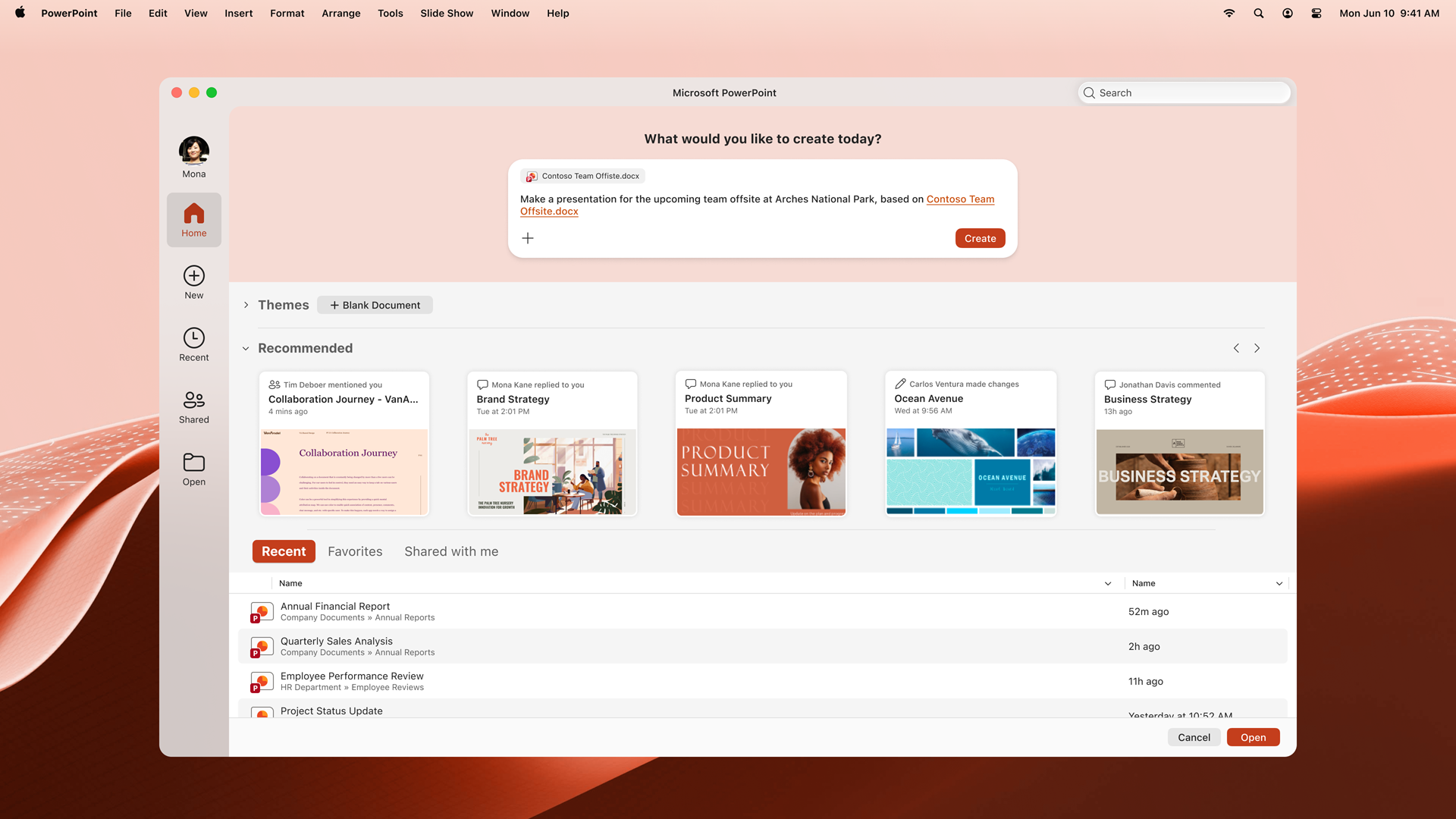
PowerPoint for Mac will enable users with a Microsoft Copilot license to create presentations directly from PowerPoint Home in the File menu, starting late May 2026. The feature is enabled by default, requires no admin changes, and aims to streamline the workflow from idea to draft.

Details

Introduction

We’re improving how users get started with Copilot in PowerPoint for Windows by enabling presentation creation powered by Copilot directly from PowerPoint Home in the File menu. This update reduces friction at the start of the workflow, helping users move from idea to first draft faster without needing to open a new file.

This message is associated with Microsoft 365 Roadmap ID 560536.

When this will happen:

General Availability (Worldwide): Rollout begins in late May 2026.

How this affects your organization:

Who is affected:

  • Users on PowerPoint for Mac
  • Users who are assigned a Microsoft Copilot license

What will happen:

  • Users will find a new option on PowerPoint Home (File menu) to create a presentation using Copilot.
  • PowerPoint Homepage Copilot experience on Mac.

  • The experience is available immediately when PowerPoint is opened.
  • The feature is enabled by default for eligible users.
  • Existing Microsoft 365 and Copilot policies are respected; no admin configuration changes are required.

What you can do to prepare:

  • No action is required.
  • Consider informing users about this new Copilot capability.

Compliance considerations:

No compliance considerations identified, review as appropriate for your organization.

Timeline

Published
May 15, 2026
Message published to Message Center
Updated
May 15, 2026
Message content updated
End Date
Feb 1, 2027
Message timeline ends

Tags

#New feature#User impact

Category

Stay Informed

Related Messages

Similar updates

MC1311974

PowerPoint for Windows: Create a presentation with Copilot directly from PowerPoint Home

May 15, 2026
MC1311972

PowerPoint for the web: Create a presentation with Copilot directly from the PowerPoint web app

May 15, 2026
MC1309746

Microsoft 365 Copilot: Copilot chat pane and Summary feature in OneNote Mobile (Android)

May 13, 2026
MC1309737

PowerPoint for the web: "Review this presentation" skill in Copilot

May 13, 2026
MC1309736

PowerPoint for Mac: "Review this presentation" skill in Copilot

May 13, 2026