Updated July 17, 2026: We have updated the timeline. Thank you for your patience.
Introduction
We are expanding Microsoft Purview DLP for Microsoft 365 Copilot and Copilot Chat to safeguard risks from external emails. This real-time control helps organizations mitigate data risks by preventing Microsoft 365 Copilot and Chat from processing emails from senders external to your organization.
This message is associated with Microsoft 365 Roadmap ID 561552.
When this will happen
- Public preview: We will begin rolling out in early June 2026 and expect to complete by late June 2026.
- General availability (Worldwide): We will begin rolling out in late January 2027 (previously late July) and expect to complete by late February 2027 (previously late August).
How this affects your organization
Who is affected
- Organizations using Microsoft 365 Copilot (Premium) or Copilot Chat
- Admins managing AI governance, security, and data protection using Microsoft Purview
What will happen
- A new DLP policy control will be available for Microsoft 365 Copilot and Copilot Chat.
- When enabled by an admin:
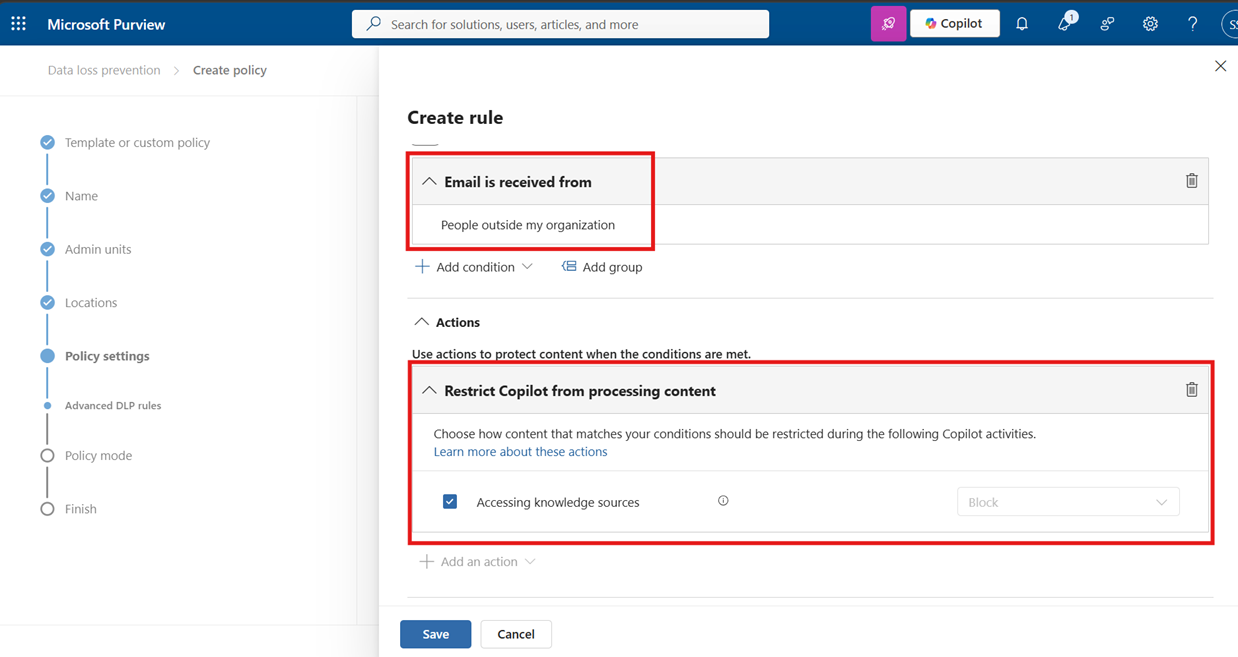
- Emails sent from external or untrusted domains are excluded from being:
- Referenced
- Summarized
- Used as grounding data by Copilot
- Copilot continues to generate responses using trusted internal Microsoft 365 data sources (for example, SharePoint, OneDrive, and internal Exchange content), subject to existing licensing and policy.
This change does not:
- Affect email delivery, retention, eDiscovery, or user access
- Change existing Copilot interaction behavior unless the policy is explicitly configured
Default state:
- Off by default.
- There is no change unless an admin enables this control in Microsoft Purview.
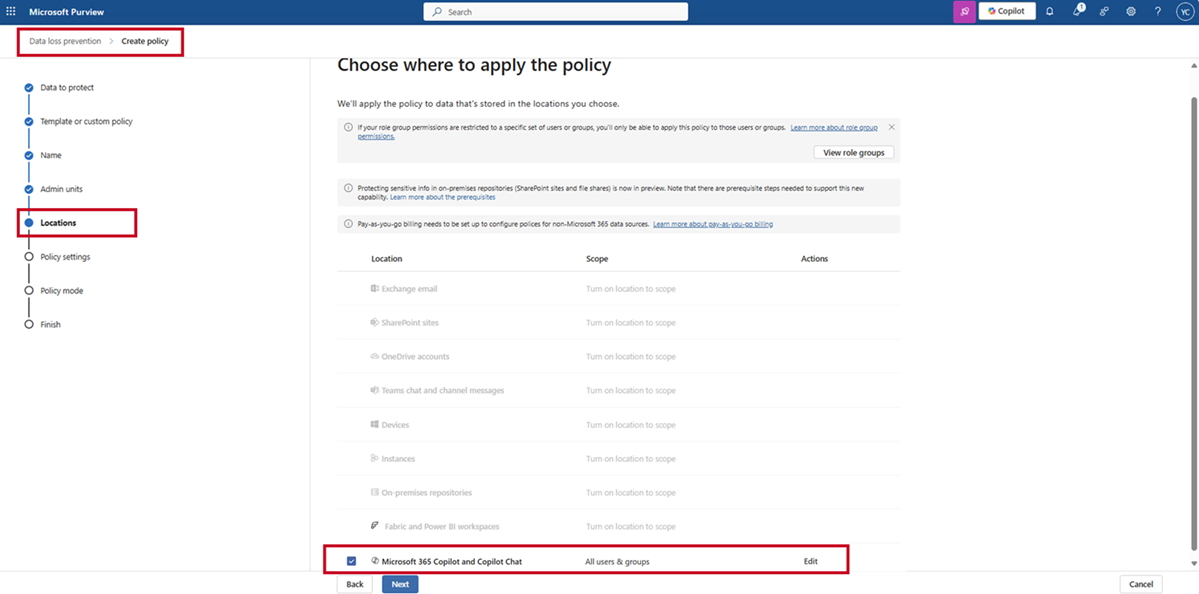
Screenshot 1. Select Microsoft 365 Copilot and Copilot Chat as the DLP policy location:
Screenshot 2. New DLP setting to restrict processing of external email content:
What you can do to prepare
No action is required if you do not plan to use this capability.
If you want to enable the feature:
- Create or update a DLP policy for Microsoft 365 Copilot in the Microsoft Purview portal.
- Review existing DLP configurations to understand potential Copilot impact.
- Ensure your admin account has the required DLP and Purview roles.
- Inform IT, security, and helpdesk teams about the new control.
- Update internal documentation related to AI governance and Copilot usage.
Learn more:
- Learn about data loss prevention | Microsoft Purview | Microsoft Learn
- Learn about using Microsoft Purview Data Loss Prevention to protect interactions with Microsoft 365 Copilot and Copilot Chat | Microsoft Purview | Microsoft Learn
- Permissions - Create and deploy data loss prevention policies | Microsoft Purview | Microsoft Learn
Compliance considerations
| Question | Answer |
| Does the change alter how existing customer data is processed? | Yes. External email content is excluded from Copilot grounding when the policy is enabled; underlying email storage, access, and retention are unchanged. |
| Does the change introduce or modify AI/ML capabilities interacting with customer data? | Yes. Copilot grounding logic is updated to respect a new DLP exclusion for external email content. |
| Does the change modify Purview DLP enforcement? | Yes. Adds a new DLP control scoped specifically to Copilot and Copilot Chat grounding behavior. |
| Does the change include an admin control? | Yes. The feature is controlled via Microsoft Purview DLP policies and is admin-configurable. |