🦉
Message CenterMicrosoft 365 Updates
HomePermissionsTenant FinderM365 ReportPortfolio
🦉
M365 Message Centerby Cengiz YILMAZ

Track the latest updates, features, and announcements for Microsoft 365 services. Comprehensive archive of service updates and important changes.

Quick Links

HomePermissionsTenant FinderM365 ReportPortfolio

Connect

© 2026 M365 Message Center. Created with ❤ by Cengiz YILMAZ

Data sourced from Microsoft 365 Message Center • Not affiliated with Microsoft

  1. Home
  2. /
  3. MC1287365

Microsoft 365 Copilot: Change in accessing additional agents in Excel

Informational

Message ID

MC1287365
View in Admin Center

Services

Microsoft 365 apps

Summary

Starting late April 2026, Excel users with Microsoft 365 Copilot licenses can access additional Copilot agents via the "…" menu in the header. The chat-only experience remains unchanged, no admin action is needed, and existing licensing and policies continue to apply.

Details

Introduction

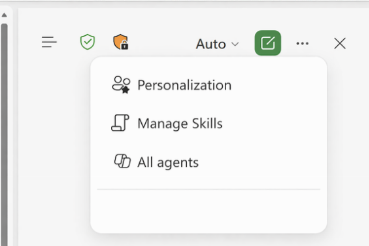
We are updating the Chat-only Copilot experience in Excel to better align with the editing experience. As part of this update, users who want to access additional Copilot agents (such as Researcher or Analyst) can do so by selecting the “…” menu in the header and choosing M365 Copilot.

When this will happen

  • General Availability (Worldwide): Rollout starts in late April 2026 and is expected to be complete by late April 2026.

How this affects your organization

Who is affected

All Excel users with Microsoft 365 Copilot licenses

What will happen

  • Users can continue to use the chat‑only Copilot experience in Excel to ask questions, analyze data, and receive insights without modifying workbook content.
  • However, users who want to access additional Copilot agents (such as Researcher or Analyst) can do so by selecting the "…" menu in the Excel header and choosing M365 Copilot:

  • Existing Microsoft 365 Copilot licensing and policy controls are respected.
  • There is no change to workbook editing behavior or data permissions.

What you can do to prepare

No admin action is required.

  • Inform helpdesk and support teams about the new access path to Microsoft 365 Copilot from Excel.
  • Update internal documentation or training materials that describe Copilot experiences in Excel.
  • Review Microsoft 365 Copilot documentation if you want to understand available agents and licensing requirements.

Learn more: Edit with Copilot in Excel | Microsoft Support

Compliance considerations

No compliance considerations identified. Review as appropriate for your organization.

Timeline

Published
Apr 21, 2026
Message published to Message Center
Updated
Apr 21, 2026
Message content updated
End Date
May 30, 2026
Message timeline ends

Tags

#New feature#User impact#Admin impact

Category

Stay Informed

Related Messages

Similar updates

MC1275566

Microsoft 365 Copilot: Multimodal capture in Copilot Notebooks in the OneNote mobile app (iOS)

Apr 9, 2026
MC1275564

Microsoft 365 Copilot: Updated Copilot Notebooks overview page experience

Apr 9, 2026
MC1267867

Microsoft 365 Copilot (Premium): Choose your AI model when editing presentations in PowerPoint

Apr 1, 2026
MC1266021

Microsoft 365 Copilot: New chat-first design for the Copilot mobile app

Mar 30, 2026
MC1234661

DLP policies will be able to block Copilot processing of sensitivity‑labeled files in all storage locations

Feb 19, 2026