🦉
Message CenterMicrosoft 365 Updates
HomePermissionsTenant FinderM365 ReportPortfolio
🦉
M365 Message Centerby Cengiz YILMAZ

Track the latest updates, features, and announcements for Microsoft 365 services. Comprehensive archive of service updates and important changes.

Quick Links

HomePermissionsTenant FinderM365 ReportPortfolio

Connect

© 2026 M365 Message Center. Created with ❤ by Cengiz YILMAZ

Data sourced from Microsoft 365 Message Center • Not affiliated with Microsoft

  1. Home
  2. /
  3. MC1282567

Create charts on pages with AI in SharePoint

Informational

Message ID

MC1282567
View in Admin Center

Roadmap ID

560076
View in Roadmap

Services

SharePoint Online

Affected Platforms

Web

Summary

SharePoint introduces an AI-assisted Charts web part for page authors to create interactive charts using plain-language prompts. Rolling out May 2026, it requires a Microsoft 365 Copilot (Premium) license. Users can add, edit, and customize charts easily within SharePoint pages with existing permissions applying.

Details

Introduction

We’re introducing a new Charts web part with AI assistance in SharePoint, designed to help page authors quickly create rich, interactive charts using plain-language prompts. This update reduces the time and effort needed to visualize data on SharePoint pages and enables more intuitive, AI-powered authoring experiences directly within SharePoint.

This message is associated with Microsoft 365 Roadmap ID 560076.

When this will happen:

  • Targeted Release: Rollout begins in early May 2026 and is expected to complete by mid-May 2026.
  • General Availability (Worldwide): Rollout begins in mid-May 2026 and is expected to complete by late May 2026.

How this affects your organization:

Who is affected:

  • SharePoint page authors
  • Tenants using SharePoint Online
  • A Microsoft 365 Copilot (Premium) license is required to use this feature

What will happen:

  • While editing a SharePoint page, a Chart web part can be added in one of the following ways:
    • Open the AI agent chat pane from the Agents coin icon in the upper-right navigation or the AI sparkle icon on the page toolbar.
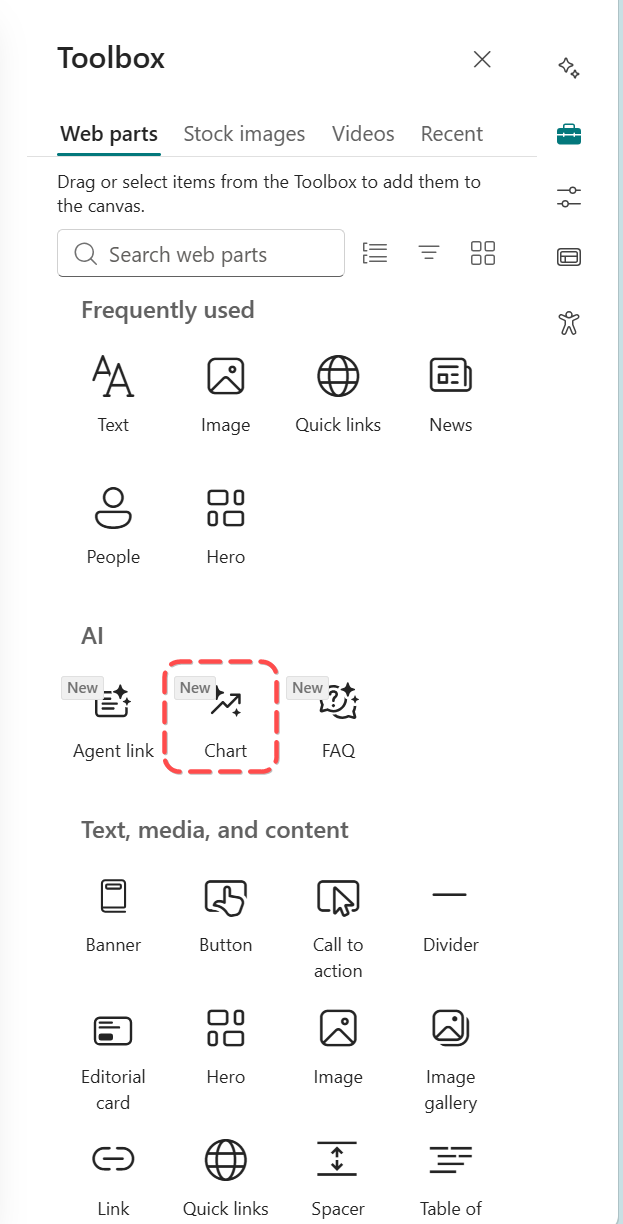
    • Open the web part toolbox, search for Chart under the AI category, and add it to the page (this automatically opens the chat pane).
    • Screenshot 1: Entry point if adding a chart from the web part toolbox:

      user settings

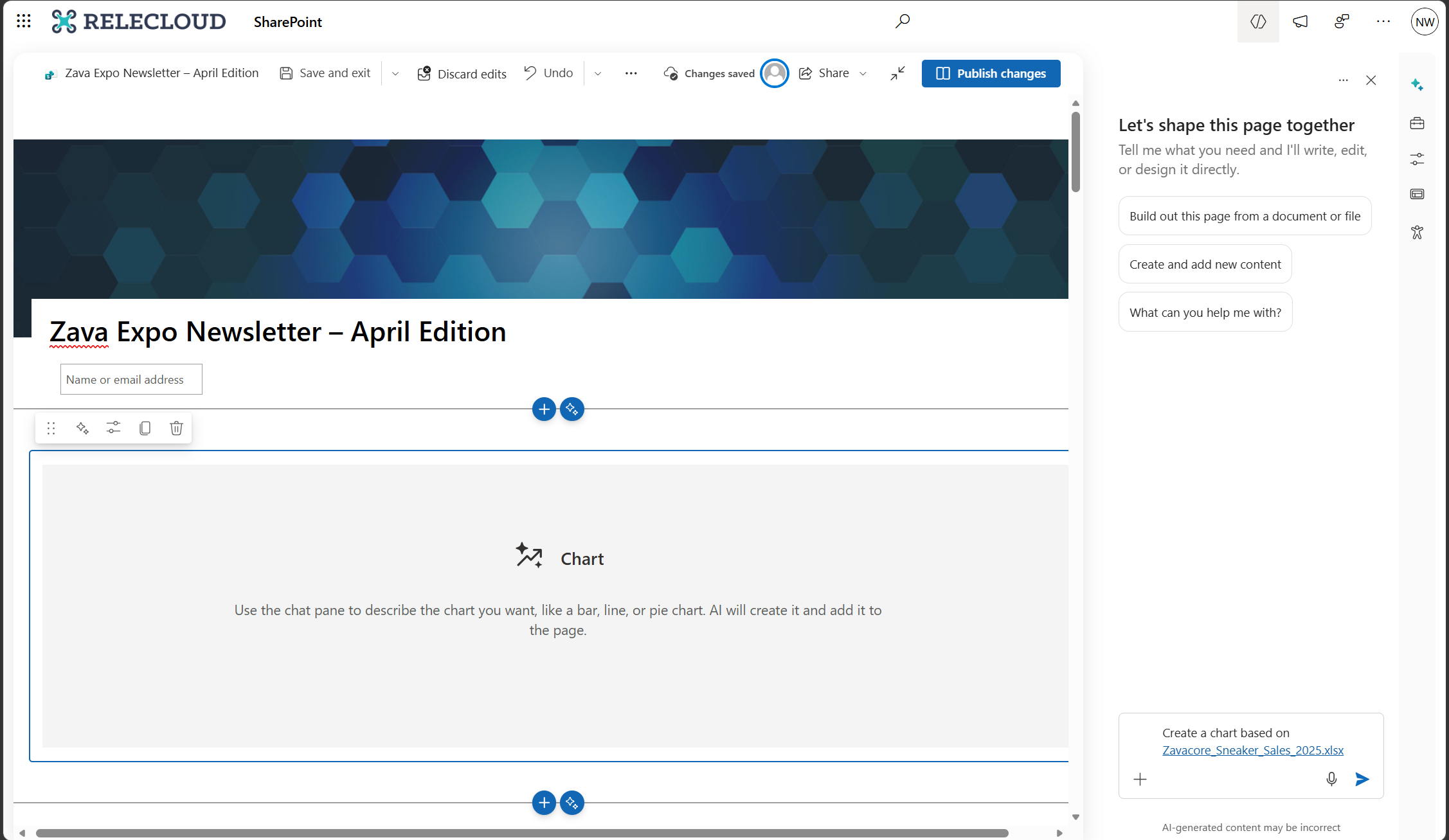
  • Describe the chart to create using plain language, such as the data to visualize and the chart type. Relevant files can be attached to provide additional context.
  • Screenshot 2: Prompt to add a chart through the chat pane:

    user settings

  • After the chart is created, follow-up prompts can be used to:
    • Add, edit, or remove data
    • Adjust the look and feel of the chart
  • Changes can be reverted at any time using the Undo button in the command bar.
  • The feature is enabled by default for users with a Microsoft 365 Copilot license, and existing SharePoint permissions and Microsoft 365 policies continue to apply.

What you can do to prepare:

No action is required.

  • Optionally inform SharePoint authors of the new capability.
  • Update internal documentation if you provide SharePoint or Copilot guidance.
  • Review Copilot licensing assignments to confirm which users will have access.

Learn more: Create a chart on pages with AI in SharePoint | Microsoft Support

Compliance considerations:

This change introduces a new way for users to interact with generative AI by using natural language prompts to create and edit charts in SharePoint pages.

Timeline

Published
Apr 16, 2026
Message published to Message Center
Updated
Apr 16, 2026
Message content updated
End Date
Jul 1, 2026
Message timeline ends

Tags

#New feature#User impact

Category

Stay Informed

Related Messages

Similar updates

MC1282683

Create and edit SharePoint pages with Copilot-powered AI

Apr 16, 2026
MC1269863

OneDrive and SharePoint: Undo and Redo for PDF annotations on OneDrive for web

Apr 3, 2026
MC1261592

View and edit Markdown files in OneDrive and SharePoint

Mar 25, 2026
MC1255409

Lists as a knowledge source for agents in SharePoint and OneDrive

Mar 18, 2026
MC1247902

SharePoint: AI citations analytics for documents and pages

Mar 9, 2026