Services
Affected Platforms
Summary
Microsoft 365 will release In-Person Events (IPE) with Hybrid RSVPing (HRSVP) in March 2024. Organizers can request in-person attendance, while attendees can confirm if they can participate in-person or virtually. The new functionalities will be available on Microsoft Outlook on the Web (OWA) and the new Outlook Desktop for Windows. No preparation is required.
Details
In March 2024, we will release a new feature called In-Person Events (IPE), which includes Hybrid RSVPing (HRSVP). IPE will help users effectively schedule in-person meetings.
This message is associated with Microsoft 365 Roadmap ID 322590
When this will happen:
Worldwide: We will begin rolling out late March 2024 and expect to complete by mid-April 2024.
How this will affect your organization:
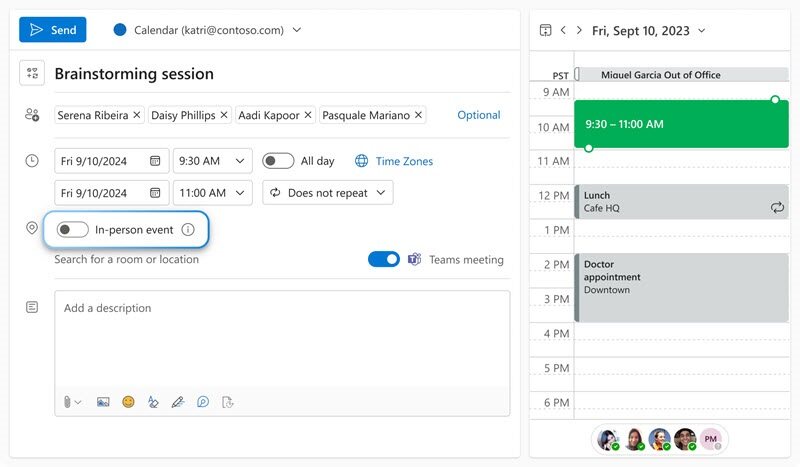
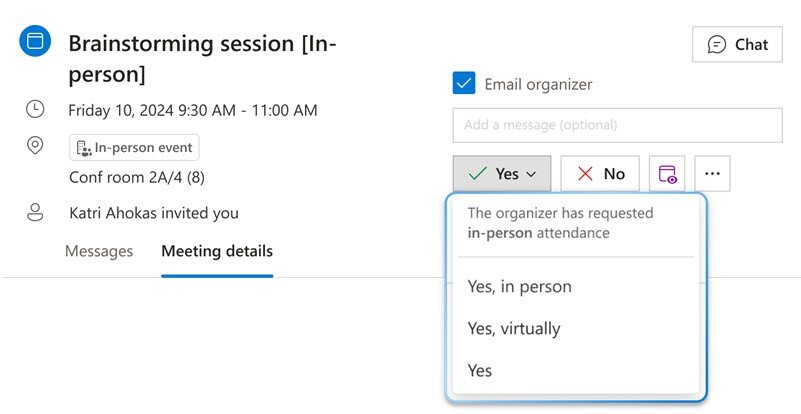
Both meeting organizers and attendees will have new functionalities at their disposal. While scheduling meetings, organizers will be able to request in-person attendance via a new "in-person event" toggle. While responding (RSVP) to in-person meeting invites, attendees will be able to confirm whether they can participate in-person or only participate virtually/online. For not-in-person invites, the RSVP options will continue to be the same. These new functionalities will only be available on Microsoft Outlook on the Web (OWA) and the new Outlook Desktop for Windows.
What you need to do to prepare:
There is nothing you need to do to prepare. This feature cannot be turned on/off by tenant admins themselves at this time.