Services
Summary
Copilot in Microsoft Teams chat and channels will soon support multi-turn conversations, allowing users to ask follow-up questions to a Copilot response. This feature will be available on Desktop, Web, and Mobile starting from early April 2024. Users are advised to notify their teams and update internal documentation as needed.
Details
Updated March 11, 2024: We have updated the rollout timeline below. Thank you for your patience.
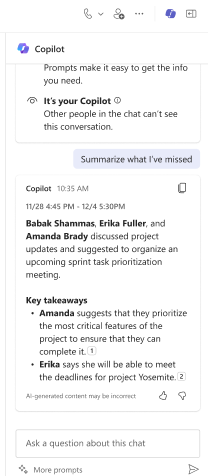
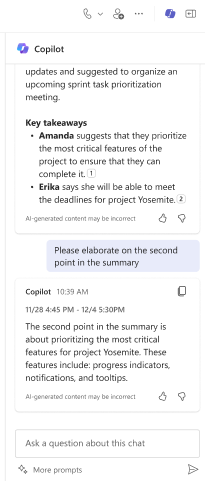
We are excited to announce that users of Copilot in Microsoft Teams chat and channels will soon be able to ask follow-up questions to a Copilot response. Copilot can now answer your queries in a conversational way, using the context of previous messages. Copilot will have context of the past two questions and responses over a period of 24 hours. You can access this feature on Desktop, Web, and Mobile.
When this will happen:
Worldwide: We will begin rolling out early April 2024 (previously late February) and expect to complete by late April 2024 (previously early March).
How this will affect your organization:
Prior to this feature, when you asked Copilot a follow-up question to a response, Copilot would be unable to adequately respond. As a result of the release of this feature, you can now ask Copilot a follow-up question to a response such as “please elaborate on the second point in the summary.â€
What you need to do to prepare:
You may want to notify your users about this new capability and update internal documentation as appropriate.